Comparison
Busabase vs Sanity for AI Agents
Sanity is a content platform: its agents draft and transform the structured content you publish to websites and apps. Busabase is the workspace where agents and your team do the rest of the work — records, docs, files, Skills, and apps — and every change an agent makes arrives as a Change Request with a field-level diff you can read, review, and undo.
Both take agent writes seriously, and Sanity deserves credit for staging them as drafts by default. This page compares them by the jobs teams actually bring to them.
Last verified 13 November 2026 against Sanity's pricing page and its documentation for Agent Actions, the MCP server, Content Agent, Content Releases, drafts, and history.
The short verdict
Choose Busabase when
Choose Sanity when
Use both when
The core difference: every change is a Change Request
Think of it as a pull request for your data. In Busabase, every edit — a record, a Doc, a Skill file, a schema change — is a Change Request: a branch with a chain of immutable commits, a message, and a field-level before and after. Merging moves the record forward; nothing is overwritten.
Sanity's answer is the draft, and it is a good one. By default, its Agent Actions “never mutate a published document”: given a published ID, “the action creates a draft first before applying any changes.” Its MCP server saves patches “to the draft or release version, never directly to published content.” What a person then reviews is a new version of a content document, before it is published.
So the question is not who has a review step. It is what gets reviewed, and how much of your work it covers.
- One review queue for every edit. Whatever an agent touched — a CRM row, a policy Doc, a Skill file — the reviewer sees the changed values, from what to what, in the same Inbox, with the agent’s message explaining why.
- It covers everything in the workspace. Records, Doc bodies, Skill files, and schema changes all go through the same Change Request — not only the documents of a content model.
- Know which agent did it. The author and the key or tool the change came through — API, MCP, or CLI — stay on the commit, with the message explaining why.
- History does not expire. Every record, Doc, and Skill keeps its full history and any change can be rolled back.
- Review when you choose, enforced by permission. Writes with write access merge immediately. Give an agent a proposal-only key and it cannot apply anything: its changes wait in the Inbox for a person to approve or send back.
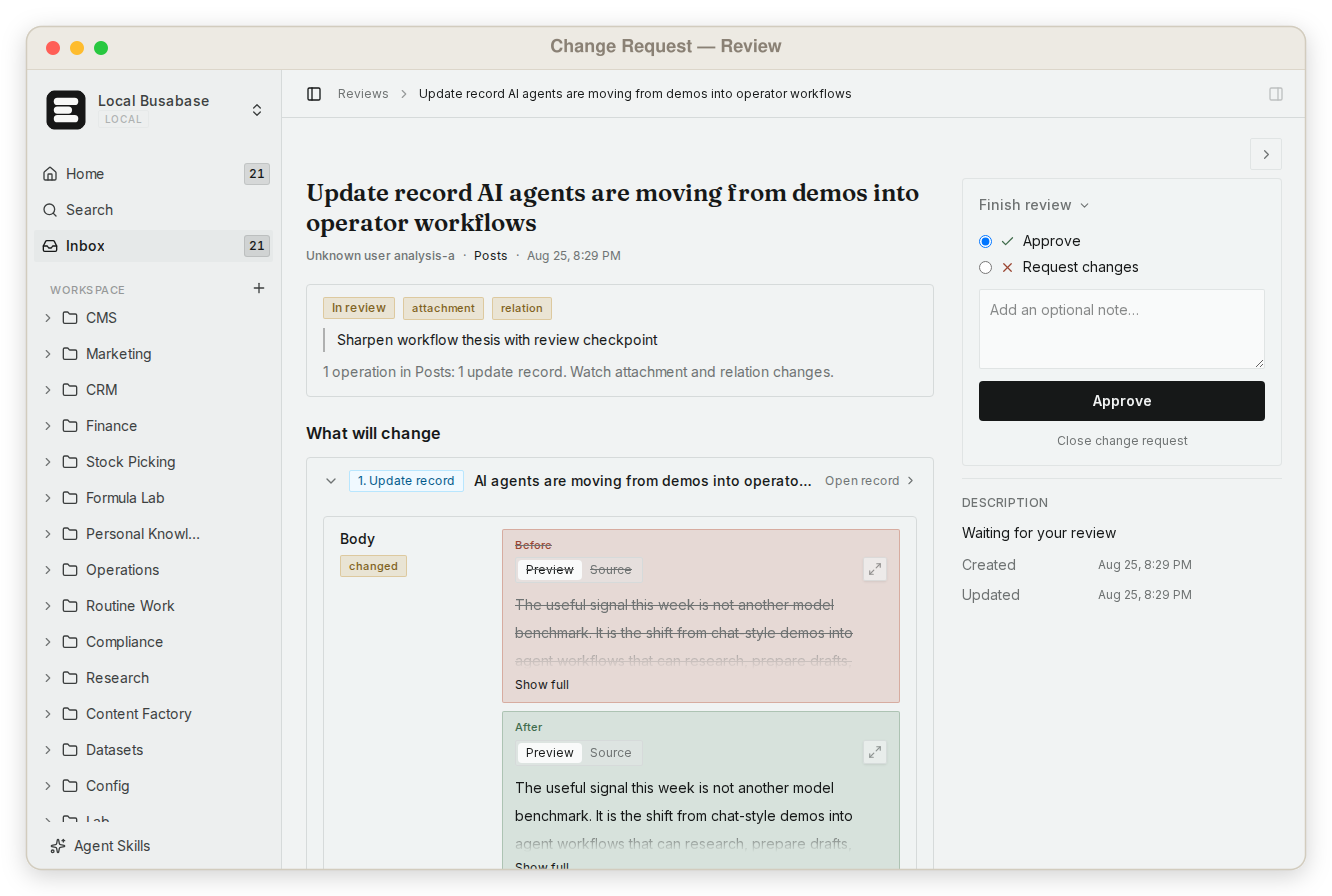
This is what makes it safe to let any agent write to the data your team actually runs on — not by keeping it out, but by making every change visible, attributable, and reversible.
What else Busabase gives your agents and your team
Sanity is built around content documents headed for an audience. Busabase covers the team's work around them — and all of it comes with the workspace.
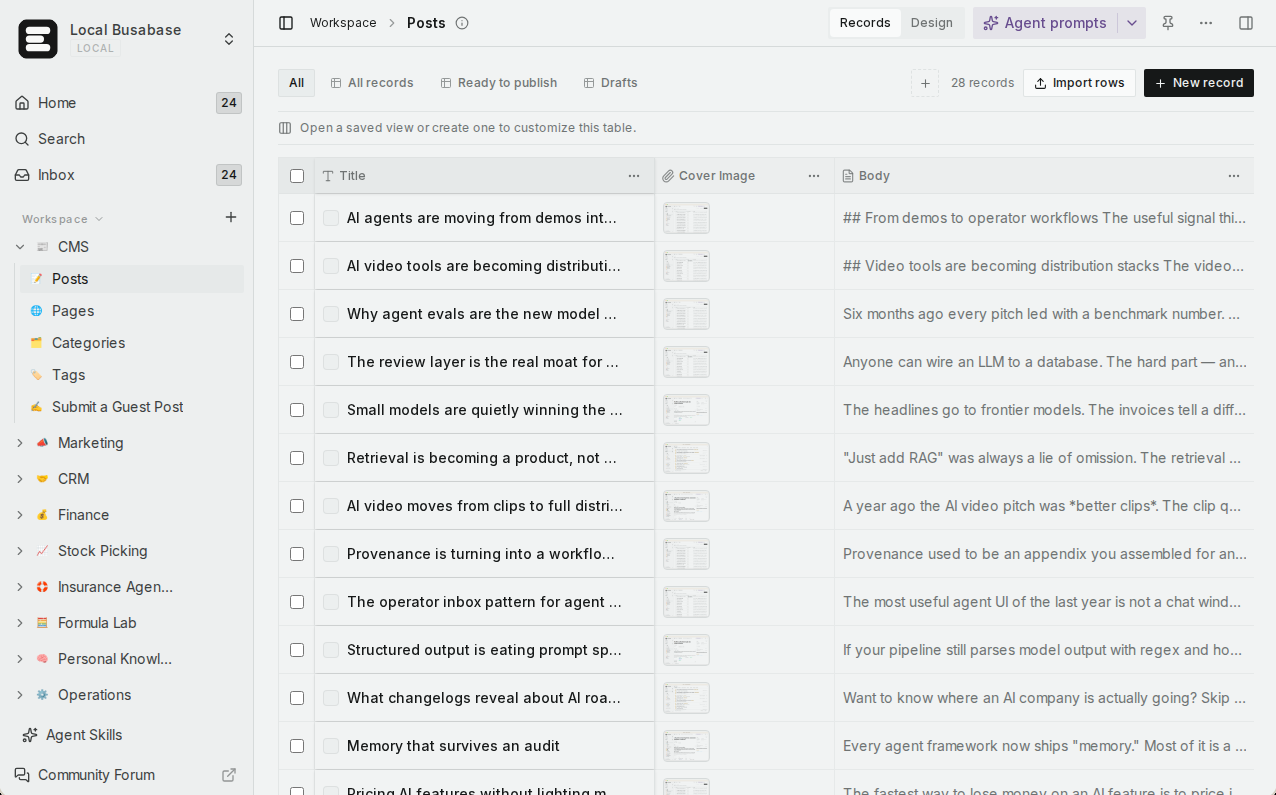
Visual data tables
A team knowledge base
Grep across everything
Skills you upload
Apps with four engines
Websites on your domain
Built for teams
Agents connect in minutes
Runs where your data has to
Comparison by the job you are trying to do
Rows are the jobs teams bring to these two products, not feature checkboxes. Where Sanity is the right tool, the table says so.
| What you are trying to do | Busabase | Sanity |
|---|---|---|
| Review exactly what an agent changed | Yes — a Change Request with a field-level before and after | Yes, per document — agent edits land in a draft; a comparison view highlights changed fields between versions before you publish |
| Put the same review on every kind of edit | Yes — records, Doc bodies, Skill files, and schema changes | Drafts and releases cover content documents |
| Let one agent propose but never apply | Yes — a proposal-only key; its changes wait in the Inbox | Drafts by default; whether an agent can also publish depends on its token's role — the MCP server includes a publish tool |
| See which agent made a change, through which tool, and why | Yes — author, key or tool, and message on every commit | Revision events such as Edited and Published in document history |
| Keep history and roll back any change | Yes — full history on every record, Doc, and Skill, no expiry | History retention by plan: 3 days Free, 90 days Growth, 365 days or custom on Enterprise |
| Let teammates read and edit what agents wrote | Yes — table, gallery, kanban, calendar, and Gantt views with no setup | Studio editing forms built from a schema your developers define in code |
| Run a team knowledge base | Yes — Docs, files, and Bases in one tree with shared permissions | Structured content documents and assets, modelled for publishing |
| Find exact text across everything | Yes — one regex grep across files, Doc bodies, records, and agent prompts | GROQ queries over your content documents |
| Give every agent the same team Skills | Yes — upload once; every connected agent reads the same version | Not a product concept; Agent Actions take instructions per request |
| Turn the data into an app or a website on your domain | Yes — AirApps in four engines; Website engine on Cloudflare Workers with custom domains (Plus and above on Cloud) | Headless by design: you build and host the front end |
| Connect Claude Code, Codex, Cursor, and other agents | Yes — MCP, CLI, OpenAPI, webhooks, and agent plugins | Yes — a hosted MCP server at mcp.sanity.io, plus Agent Actions through the client |
| Self-host, including offline | Yes — the whole product is MIT, from a laptop to an air-gapped network | Studio is MIT open source; content is stored in Sanity's hosted Content Lake |
| Predictable pricing as the team grows | Flat per seat — no metered overage | Per seat on Growth, plus pay-as-you-go overage for API requests, bandwidth, and assets |
| Deliver structured content to websites and apps across channels | Not its job — use Sanity | Yes — this is Sanity's home ground: Studio, GROQ, the API CDN, scheduling, and releases |
Coming next
Three features are being built now. They are not available yet; we list them so you can plan, and this page will be updated when they ship.
App users In development
Ontology In development
Fine-grained permissions In development
What Sanity gets right about agent writes
Sanity was early to the right default, and its review story has real depth. Agent Actions — Generate, Transform, Translate, Prompt, and Patch — are schema-aware and write to drafts unless you pass forcePublishedWrite: true or the type uses liveEdit. Content Agent goes further for bulk work: “All edits are staged as proposed changes. Review in one place, adjust what to include, then release together.” And Content Releases group many document changes into one unit you can preview and publish together or on a schedule.
Two caveats worth knowing. The Agent Actions docs describe them as an experimental feature whose APIs “are subject to change,” and each request uses AI credits. Content Releases are “available on certain Enterprise plans”; Growth gets Scheduled Drafts for single documents.
The deeper difference is scope. Sanity's review machinery is built for content documents on their way to readers. Busabase puts one Change Request on every kind of edit in the workspace — the CRM row an agent enriched, the policy Doc it corrected, the Skill another agent will follow tomorrow — and lets the agent's key decide whether it may apply the change or only propose it.
Using them together
A common split for a team that publishes content and runs agents:
- A research agent gathers sources, product facts, and customer quotes into Bases in Busabase. Every value it adds or corrects is a Change Request the team can trace.
- The team keeps briefs, brand rules, and the Skills that tell agents how to write in the same workspace, so every agent reads the same version.
- When something becomes public-facing content, a writing agent drafts it in Sanity, where editors review the draft and publish it through releases.
- Sanity delivers that content to your sites and apps; Busabase keeps the facts, the rules, and the history behind it.
Neither product replaces the other. Sanity ships your content to an audience; Busabase keeps your agents' working material visible, reviewable, and reusable.
Pricing at a glance
Busabase
Plus: from $10 per seat per month (billed yearly). Pro: from $20.
Flat per seat, no metered overage. Self-hosting is free under MIT with no seat limit.
Sanity
Growth: $15 per seat per month, up to 50 seats, 25,000 documents; Viewer seats are free. Usage above the included API requests, bandwidth, and assets is billed pay-as-you-go.
Enterprise: custom, including SSO and longer history retention.
Prices as published on 13 November 2026. See Busabase pricing and Sanity pricing for current details.
Where Sanity is the better choice
- Your output is content shipped to an audience. Websites, apps, and localized marketing fed from one content model through GROQ and the API CDN — that is Sanity's whole pipeline, and Busabase does not try to be a headless CMS.
- You want a deeply customised editing experience. Studio is configured in code around your content model, with document comparison, scheduling, and releases for editorial teams.
- You run a mature editorial operation. Roles, releases, and Content Agent's staged bulk edits fit a content team's way of working.
Busabase's limits, plainly: no localization workflow, no release scheduling, no content delivery CDN, no realtime subscriptions, and no vector index. Sign-in for the end users of the apps you publish is in development (App users) but not available today. If your job is publishing content to an audience, use Sanity for that part.
Frequently asked questions
Does Sanity let agents write directly to published content?
forcePublishedWrite: true or a type using liveEdit. See Sanity's Agent Actions operations docs.Then what does Busabase add?
Does every agent write in Busabase need a human review?
How is a Change Request different from a draft?
Is Busabase a headless CMS?
Can I self-host Busabase?
Next step
Connect an agent you already use, give it a proposal-only key, and ask it to correct one real record. You will see the change arrive as a Change Request — the field, the before and after, and who sent it.
Related reading: Busabase vs Supabase · Busabase vs Notion · How platforms handle agent writes · A system of record for AI agents · How Change Requests work · Publish an AirApp as a website
Sources: Agent Actions operations, Agent Actions introduction, Sanity MCP server, Content Agent, Content Releases, Drafts and perspectives, History experience, Compare document versions, API CDN, Sanity pricing, Sanity Studio on GitHub, Busabase pricing