Comparison
Busabase vs Supabase for AI Agents
Supabase gives your application a Postgres backend. Busabase gives your agents and your team one shared workspace: visual tables, a team knowledge base, Skills, and apps — and every change an agent makes arrives as a Change Request you can read, review, and undo. If you are deciding where your agents' work should live, Busabase does that job on day one. Supabase gives you the database and leaves the rest for you to build.
Both run on Postgres, both are open source, and plenty of teams use both. This page compares them by the jobs people actually bring to them.
Last verified 13 November 2026 against Supabase's pricing page, MCP documentation and engineering blog, and Busabase's current product.
The short verdict
Choose Busabase when
Choose Supabase when
Use both when
The core difference: every change is a Change Request
Think of it as a pull request for your data. In Busabase, every edit — a record, a Doc, a Skill file, a schema change — is a Change Request: a branch with a chain of immutable commits. Merging moves the record forward; nothing is overwritten.
In Supabase, Row Level Security decides whether a write is allowed. Once it is, the new value replaces the old one. Who changed it, why, and what it said before are yours to reconstruct — or to build audit tables for.
- A message and a diff on every write. Each change says what it does and shows the field-level before and after.
- Know which agent did it. The author, and the key or tool the change came through, stay on the commit.
- Undo is built in. Every record, Doc, and Skill keeps its full history, and any change can be rolled back.
- Review when you choose. Writes with write access land immediately. Give an agent a proposal-only key and its changes wait in the Inbox for a person to approve or send back.
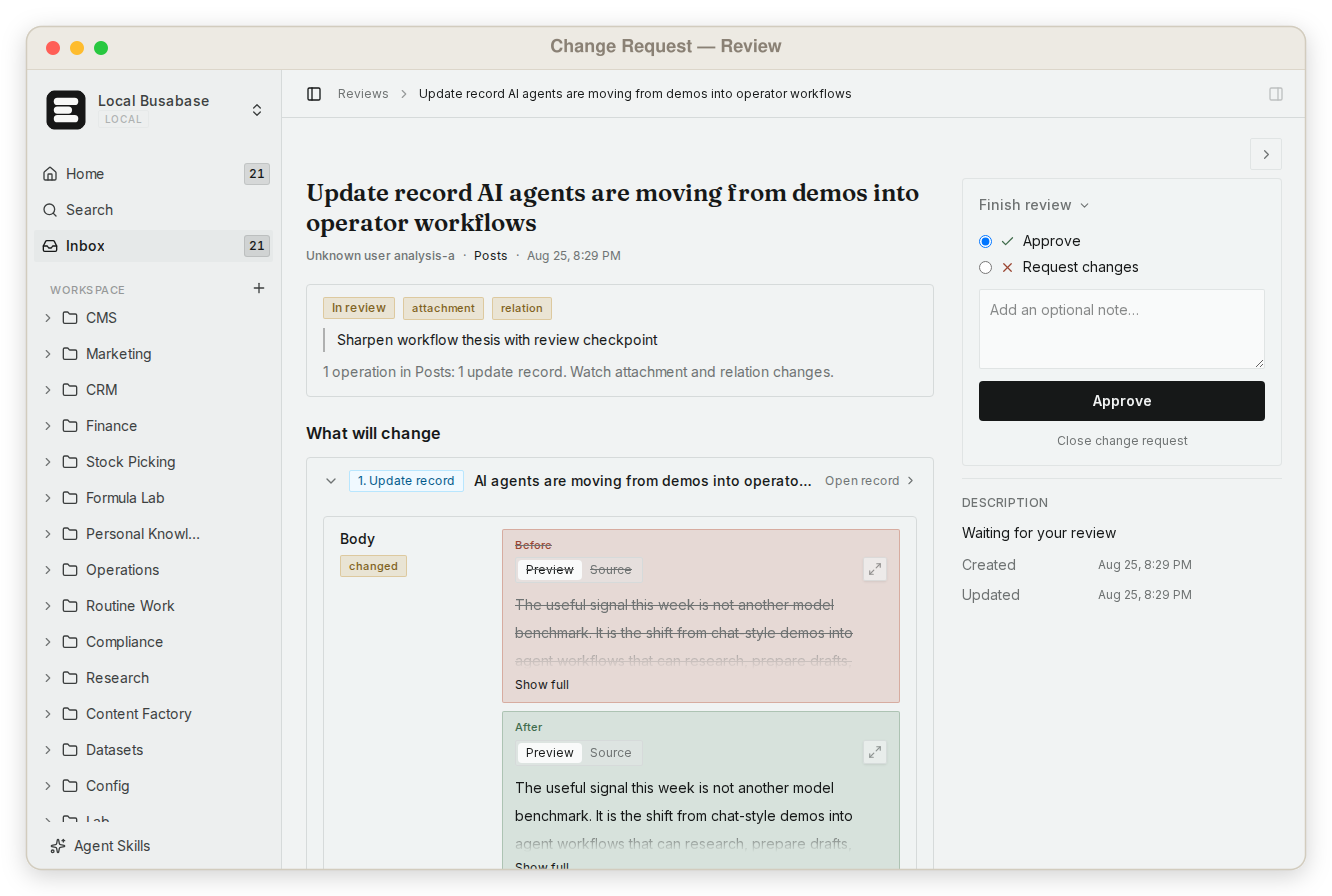
This is what makes it safe to let agents write to the data your team actually uses — not by keeping them out, but by making every change visible and reversible.
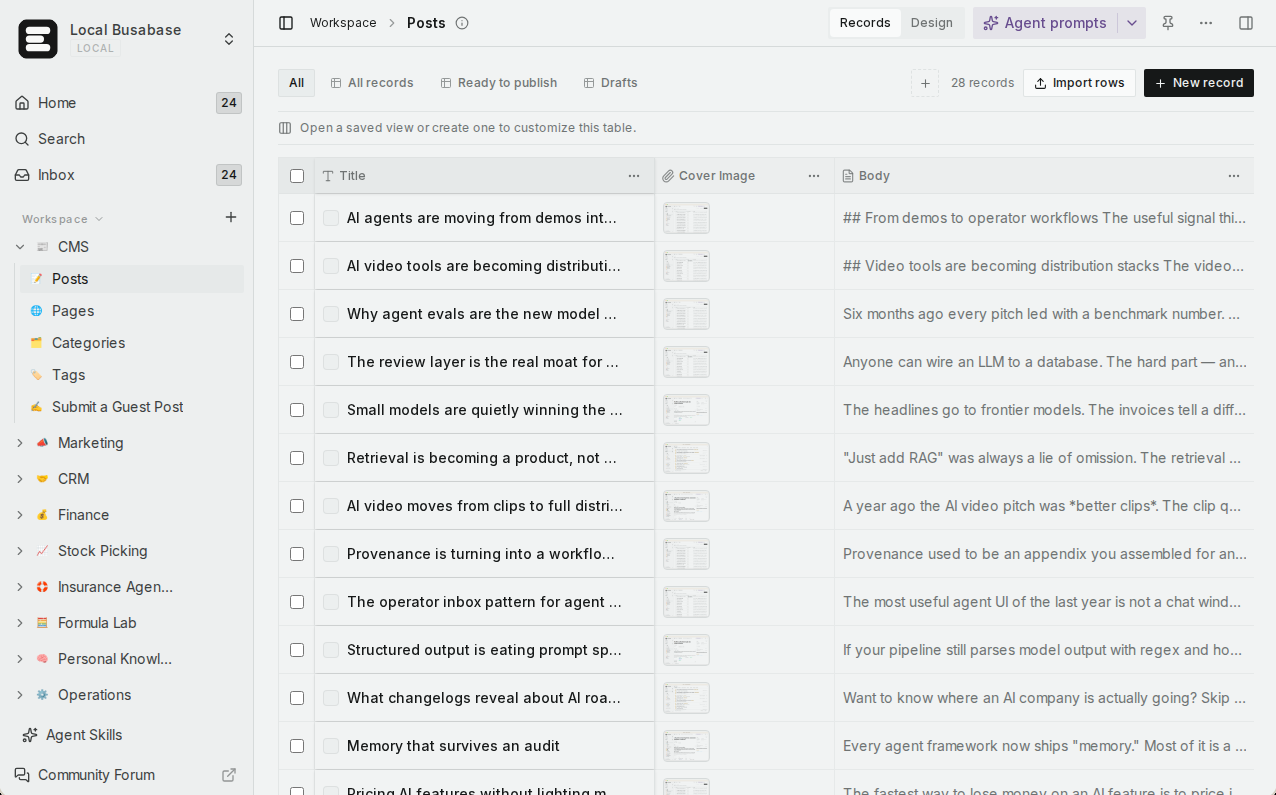
What else Busabase gives your agents and your team
On a bare database, each of these is a project you build yourself. In Busabase they come with the workspace.
Visual data tables
A team knowledge base
Grep across everything
Skills you upload
Apps with four engines
Websites on your domain
Built for teams
Agents connect in minutes
Runs where your data has to
Comparison by the job you are trying to do
Rows are the jobs teams bring to these two products, not feature checkboxes. Where Supabase is the right tool, the table says so.
| What you are trying to do | Busabase | Supabase |
|---|---|---|
| See every change before and after, and who made it | Built in — a Change Request with a field-level diff, the author and the agent key it came through, full history, and undo | Not built in: once a row is overwritten the old value is gone unless you add audit tables. Point-in-time recovery restores the whole database |
| Let one agent propose changes without applying them | Yes — a proposal-only key; its changes wait in the Inbox for a person | Not at this layer: RLS allows or denies a write, with nothing in between |
| Let teammates read and edit what agents wrote | Yes — table, gallery, kanban, calendar, and Gantt views, no SQL | Table Editor in the developer dashboard; a view for non-engineers is yours to build |
| Invite teammates and agents into one workspace | Yes — members with read, write, or manage roles; agents join with their own keys | Organization members for the developer dashboard |
| Run a team knowledge base | Yes — Docs, files, and Bases in one tree with shared permissions | Storage buckets for files; no documents |
| Find exact text across everything | Yes — one regex grep across files, Doc bodies, records, and agent prompts, with line and context | SQL and Postgres full-text search over your own tables |
| Give every agent the same team Skills | Yes — upload your Skills once; every connected agent reads the same version | Not a product feature (Supabase's own Agent Skills teach agents to use Supabase) |
| Turn the data into an app | Yes — AirApps run in the browser, on your machine, in a cloud sandbox, or as a website | Bring your own front end and hosting |
| Publish a website on the same data, on your domain | Yes — Website engine on Cloudflare Workers, custom domains (Plus and above on Cloud) | Backend only; host the site elsewhere |
| Connect Claude Code, Codex, Cursor, and other agents | Yes — MCP, CLI, OpenAPI, webhooks, and agent plugins | Yes — an MCP server; for production its docs advise project scoping and read-only mode |
| Start from a ready-made business workflow | Yes — templates such as CRM and content operations | Starter templates for application code |
| Predictable pricing as the team grows | Flat per seat — no metered overage | Per-project compute plus usage-based quotas |
| Self-host, including offline | Yes — MIT, from a laptop to an air-gapped network | Yes — Apache-2.0 via Docker, community-supported, some platform features unavailable |
| Realtime, vector search, and high-volume writes for your own app | Not its job — use Supabase | Yes — this is Supabase's home ground |
Coming next
Three features are being built now. They are not available yet; we list them so you can plan, and this page will be updated when they ship.
App users In development
Ontology In development
Fine-grained permissions In development
About connecting agents to your production database
Supabase is careful here, and right to be. Its MCP documentation says to connect to a production project only “when the task requires production evidence,” using project scoping, read-only mode, and restricted feature groups. Its engineering blog goes further for schema work: “We strongly discourage connecting the Supabase MCP server to your production database.”
That advice treats an agent near your live application mostly as a reader, which is exactly what it should be there. But most of what agents do for a team is writing: researching leads, drafting content, updating customer records, keeping operating docs current. That work needs a home where writing is the normal case, every change is recorded, and a person can step in when it matters.
That home is what Busabase is built to be. Writes from anyone with write access land immediately, with full history. Review is there when you want it — not a toll on every edit.
Using them together
A common split for a team that ships a product and runs agents:
- Your product — its users, sessions, and transactions — runs on Supabase.
- A sales agent researches accounts and writes them into a CRM Base in Busabase. The team works the pipeline on a kanban board.
- A content agent drafts posts into a Content Base. An editor reads them in the same workspace and marks what is ready.
- Your app reads the finished records through the Busabase API — or the agent publishes them as an AirApp website on your own domain.
Neither product replaces the other. Supabase keeps your application fast and correct; Busabase keeps your agents' work visible and reusable.
Pricing at a glance
Busabase
Plus: from $10 per seat per month (billed yearly). Pro: from $20.
Flat per seat, no metered overage. Self-hosting is free under MIT with no seat limit.
Supabase
Pro: from $25 per month. Team: from $599 per month.
Compute is per project — each additional project adds its own compute cost.
Prices as published on 13 November 2026. See Busabase pricing and Supabase pricing for current details.
Where Supabase is the better choice
- You are building a customer-facing application. Sign-in for your users, Row Level Security, realtime subscriptions, edge functions, and vector search — Supabase is a complete backend, and Busabase does not try to be one.
- Writes are machine-scale. Events, telemetry, and high-frequency updates belong in an application database.
- You need full database control. Migrations, connection pooling, extensions, and raw SQL access.
Busabase's limits, plainly: no realtime subscriptions, no vector index, and no migration tooling for your application's schema. Sign-in for the end users of the apps you publish is in development (App users) but not available today. If you need these now, run Supabase alongside it.
Frequently asked questions
Does Busabase replace Supabase?
Why not just build an admin UI on top of Supabase?
How is a Change Request different from an audit log?
Does every agent write need a human review?
Can my agent write to Busabase and Supabase in the same run?
Can I self-host Busabase?
Next step
Connect an agent you already use and ask it to put one real piece of work into a Base — a research list, a content calendar, a customer table. Within minutes your team can open it as a table, change it, and build on it.
Related reading: Busabase as a Notion + Supabase hybrid · The memory-and-rules layer above a database · Supabase vs Notion · How platforms handle agent writes · Publish an AirApp as a website · How Change Requests work · Search and grep
Sources: Supabase for Agents, Supabase MCP documentation, “AI Agents Know About Supabase. They Don't Always Use It Right.”, Supabase pricing, Supabase self-hosting, Busabase pricing