Comparison
Busabase vs monday.com for AI Agents
monday.com is where a company plans and tracks its projects, and it now ships its own AI agents that work on those boards. Busabase is the workspace for the agents you already use — Claude Code, Codex, Cursor, and others — and for the team that works beside them: visual tables, a team knowledge base, shared Skills, and apps. Every change an agent makes arrives as a Change Request you can read, review, and undo.
Plenty of teams will run both. This page compares them by the jobs people bring to them, and says plainly where monday.com is the better tool.
Last verified 13 November 2026 against monday.com's pricing page, help center, and Elevate ’26 product announcement, and Busabase's current product.
The short verdict
Choose Busabase when
Choose monday.com when
Use both when
The core difference: every change is a Change Request
Think of it as a pull request for your data. In Busabase, every edit — a record, a Doc, a Skill file, a schema change — is a Change Request: a branch with a chain of immutable commits. Merging moves the record forward; nothing is overwritten.
In monday.com, an edit applies the moment it is made. The activity log then records who changed which column, with “the previous value -> the new value”. How far back it goes depends on the plan: one week on Basic, six months on Standard, a year on Pro, five years on Enterprise. A change can be undone from the log “for actions performed within the last 7 days.” That is a good record of what happened. A Change Request is the change itself.
- A message and a diff on every write. Each change says what it does and shows the field-level before and after.
- Know which agent did it. The author, and the key or tool the change came through, stay on the commit.
- Undo is built in. Every record, Doc, and Skill keeps its full history, and any change can be rolled back — not just last week's.
- Review when you choose. Writes with write access land immediately. Give an agent a proposal-only key and its changes wait in the Inbox for a person to approve or send back.
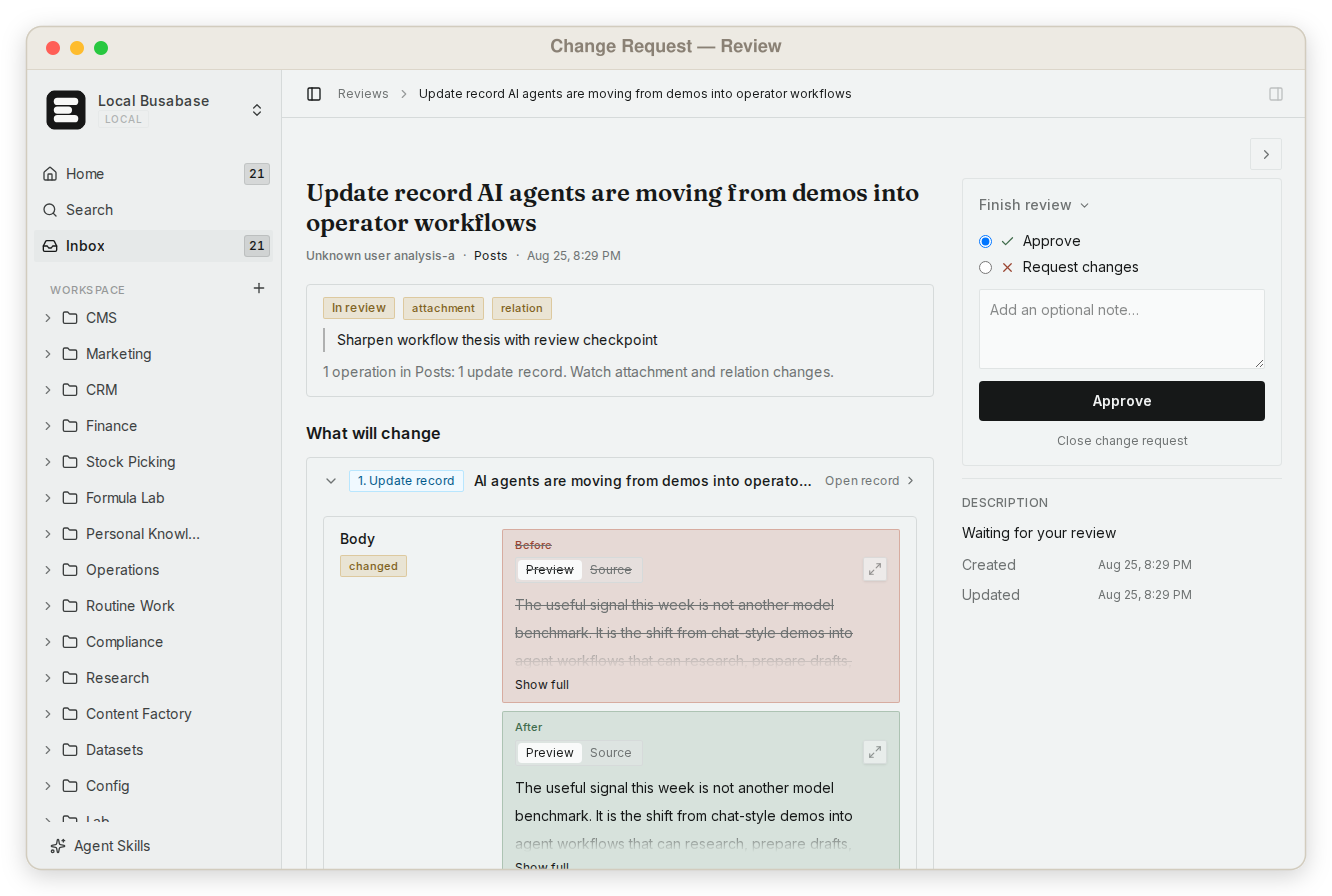
This is what makes it safe to let agents write to the data your team actually uses — not by keeping them out, but by making every change visible and reversible.
What else Busabase gives your agents and your team
On monday.com, several of these depend on the plan or a separate package. In Busabase they come with the workspace.
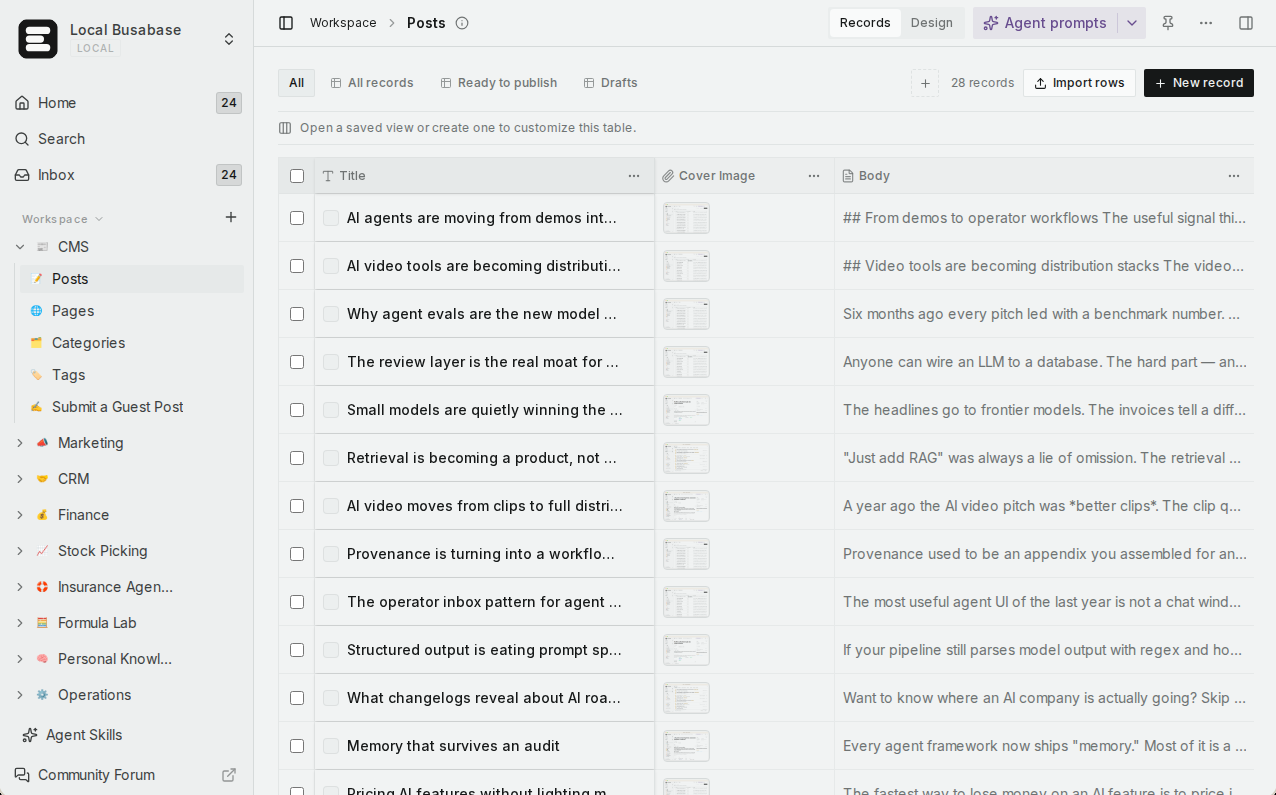
Visual data tables
A team knowledge base
Grep across everything
Skills you upload
Apps with four engines
Websites on your domain
Built for teams
Bring the agents you already use
Runs where your data has to
Comparison by the job you are trying to do
Rows are the jobs teams bring when agents start doing real work, not feature checkboxes. Where monday.com is the right tool, the last row says so.
| What you are trying to do | Busabase | monday.com |
|---|---|---|
| See every change before and after, and who made it | Built in — a Change Request with a field-level diff, the author and the agent key it came through, full history, and undo | Activity log shows who changed which column, old → new value; kept 1 week (Basic) to 5 years (Enterprise); undo from the log within 7 days |
| Let one agent propose changes without applying them | Yes — a proposal-only key; its changes wait in the Inbox for a person | Scope an agent to view-only or to specific boards; a pending, propose-only state for an agent’s edits is not documented |
| Let teammates read and edit what agents wrote | Yes — table, gallery, kanban, calendar, and Gantt views on any Base | Yes — board views; Timeline, Gantt, and Calendar from the Standard plan |
| Run a team knowledge base beside the data | Yes — Docs, files, and Bases in one tree with shared permissions | monday docs with version history; Free allows up to 3 docs, private docs from Pro |
| Find exact text across everything | Yes — one regex grep across files, Doc bodies, records, and agent prompts, with line and context | Search finds boards, docs, forms, and folders; filters work inside a board |
| Give every agent the same team Skills | Yes — upload once; Claude Code, Codex, and every other connected agent read the same version | Each monday agent has its own knowledge, tools, and skills, set in the agent builder |
| Use the agents you already pay for | Yes — MCP, CLI, OpenAPI, webhooks, and agent plugins | Yes — a hosted MCP server is preinstalled on every account, and external agents can be brought in |
| Keep costs flat as agents do more | Flat per seat — no AI credits, no metered overage | Seats plus AI credits: an agent task uses about 10 to 250+ credits; plans include 1,000–3,000 a month |
| Turn the data into an app | Yes — AirApps run in the browser, on your machine, in a cloud sandbox, or as a website | monday vibe builds no-code apps; publishing a live app needs a paid Vibe app package |
| Publish a website on the same data, on your domain | Yes — Website engine on Cloudflare Workers, custom domains (Plus and above on Cloud) | Public Vibe apps are part of the Vibe Growth package |
| Self-host, including offline | Yes — MIT, from a laptop to an air-gapped network | Hosted by monday.com on AWS, in a US, EU, or APAC data region |
| Run projects, portfolios, and dashboards for a whole company | Not its focus — use monday.com for company-wide project tracking | Yes — boards, dashboards, automations, and portfolio and resource management (Enterprise). This is monday.com's home ground |
Coming next
Three features are being built now. They are not available yet; we list them so you can plan, and this page will be updated when they ship.
App users In development
Ontology In development
Fine-grained permissions In development
monday's own agents, and the agents you already use
monday.com has gone all in on agents of its own. Its AI agents are built in an agent builder, shared through an agent directory, and “execute tasks end to end, all directly inside your boards and workflows.” They are paid for in AI credits: a simple task uses roughly 10–50 credits, an extra-complex one 250 or more. monday.com also opens the door to outside agents through a hosted MCP server that is “preinstalled on all monday.com accounts.”
Busabase takes the other side of that bet. It does not sell you agents or meter their work. You bring the agents your team already chose — Claude Code, Codex, Cursor, or your own — and Busabase gives all of them the same workspace, the same Skills, and the same rule: whatever they change becomes a Change Request with a message, a diff, and a way back.
monday.com has also announced larger data on its side: Datasets of up to 10 million items, with general release planned for the first half of 2027. That is a roadmap item, not a shipped feature today.
Using them together
A common split for a team that runs projects in monday.com and uses agents for the work around them:
- Projects, owners, and deadlines stay on monday.com boards and dashboards.
- A research agent writes accounts and findings into a CRM Base in Busabase. Every write is a Change Request, so the team can see exactly what it added or changed.
- The team's Skills — how to qualify a lead, how to write a brief — live in Busabase, so every agent follows the same playbook.
- When a piece of work is done, the agent updates the matching monday.com item through monday's MCP server, so the project view stays current.
Neither product replaces the other. monday.com keeps the company's projects moving; Busabase keeps your agents' work visible, consistent, and reversible.
Pricing at a glance
Busabase
Plus: from $10 per seat per month (billed yearly). Pro: from $20.
Flat per seat, no AI credits, no metered overage. Self-hosting is free under MIT with no seat limit.
monday.com work management
Basic: $9, Standard: $12, Pro: $19 per seat per month billed yearly ($12, $14, $24 billed monthly). Paid plans start from 3 seats. Enterprise: custom.
Plans include 1,000, 2,000, or 3,000 AI credits a month; Standard includes 250 automation actions a month, Pro 25,000.
Prices as published on 13 November 2026, in US dollars. See Busabase pricing and monday.com pricing for current details.
Where monday.com is the better choice
- You run projects and portfolios for a whole company. Boards for every team, dashboards that roll up many boards, workload and portfolio views — monday.com is built for this, and Busabase is not.
- You want agents that come with the platform. If you would rather pick ready-made agents from a vendor than bring your own, monday.com builds and bills them for you.
- Your company has already standardised on it. If everyone already plans their week in monday.com, keep it there and add Busabase for the agent work around it.
Busabase's limits, plainly: it is not built for portfolio and resource planning across many projects. Sign-in for the end users of the apps you publish is in development (App users) but not available today, and there are no realtime subscriptions or vector index.
Frequently asked questions
Does Busabase replace monday.com?
How is a Change Request different from monday.com's activity log?
Does every agent write need a human review?
Do I pay per agent task in Busabase?
Can one agent work with both?
Can I self-host Busabase?
Next step
Connect an agent you already use and ask it to put one real piece of work into a Base — a research list, a content calendar, a customer table. Then open the Change Request it made and see exactly what it wrote.
Related reading: All comparisons · Busabase vs Notion · Busabase vs Supabase · How Change Requests work · Search and grep · Publish an AirApp as a website
Sources: monday.com pricing, The Activity Log, How to undo something, AI Agents on monday.com, Run and manage your AI agents, AI Credits, monday MCP available tools, monday vibe: Permissions and Pricing, The board views, Data residency, Elevate ’26 product updates, Busabase pricing