Comparison
Busabase vs Supermemory for AI Agents
Supermemory is a memory engine: you hand it what your agent sees — conversations, files, URLs, a synced Drive — and it turns that into facts, keeps them current, and hands them back on the next turn. Busabase is where your agents and your team keep the work they will be held to: records, Docs, Skills, and apps. Every change an agent makes there arrives as a Change Request a person can read, review, and roll back.
Supermemory makes an agent remember. Busabase makes what the team knows inspectable and correctable. They sit at different layers, so the useful question is not which one wins but which job each should own. This page goes job by job.
Last verified 13 November 2026 against Supermemory's product and pricing pages, documentation, changelog, and GitHub repository, and Busabase's current product.
The short verdict
Choose Busabase when
Choose Supermemory when
Use both when
The core difference: every change is a Change Request
In Busabase an edit is never a silent overwrite. Changing a record, a Doc, a Skill file, or a Base's fields opens a Change Request — a branch made of immutable commits, each with a message. Merging moves the record forward and keeps every earlier state.
Supermemory is designed to change things for you. Its engine extracts facts from what you send, and when a newer fact contradicts an older one it “replaces what was true before for search purposes; history can remain for audit.” Facts it infers from patterns are flagged, and its docs describe a review queue where someone can approve, decline, or undo them. That is careful work for memory. But the history is of facts a model derived, and review covers inferences — not the edit a person or an agent makes to a record the team relies on.
- The why travels with the what. Each change carries its message and a field-level before and after, so nobody has to reverse-engineer an edit from a log.
- Every edit has a name on it. The author, and the key or tool the change came through, are kept on the commit — you can tell the research agent from the sales agent.
- Rollback, not cleanup. Records, Docs, and Skills keep their whole history, and any change can be reverted in one step.
- Review is your choice. Writes from a key with write access merge at once. A proposal-only key holds an agent's changes in the Inbox until a person approves or sends them back.
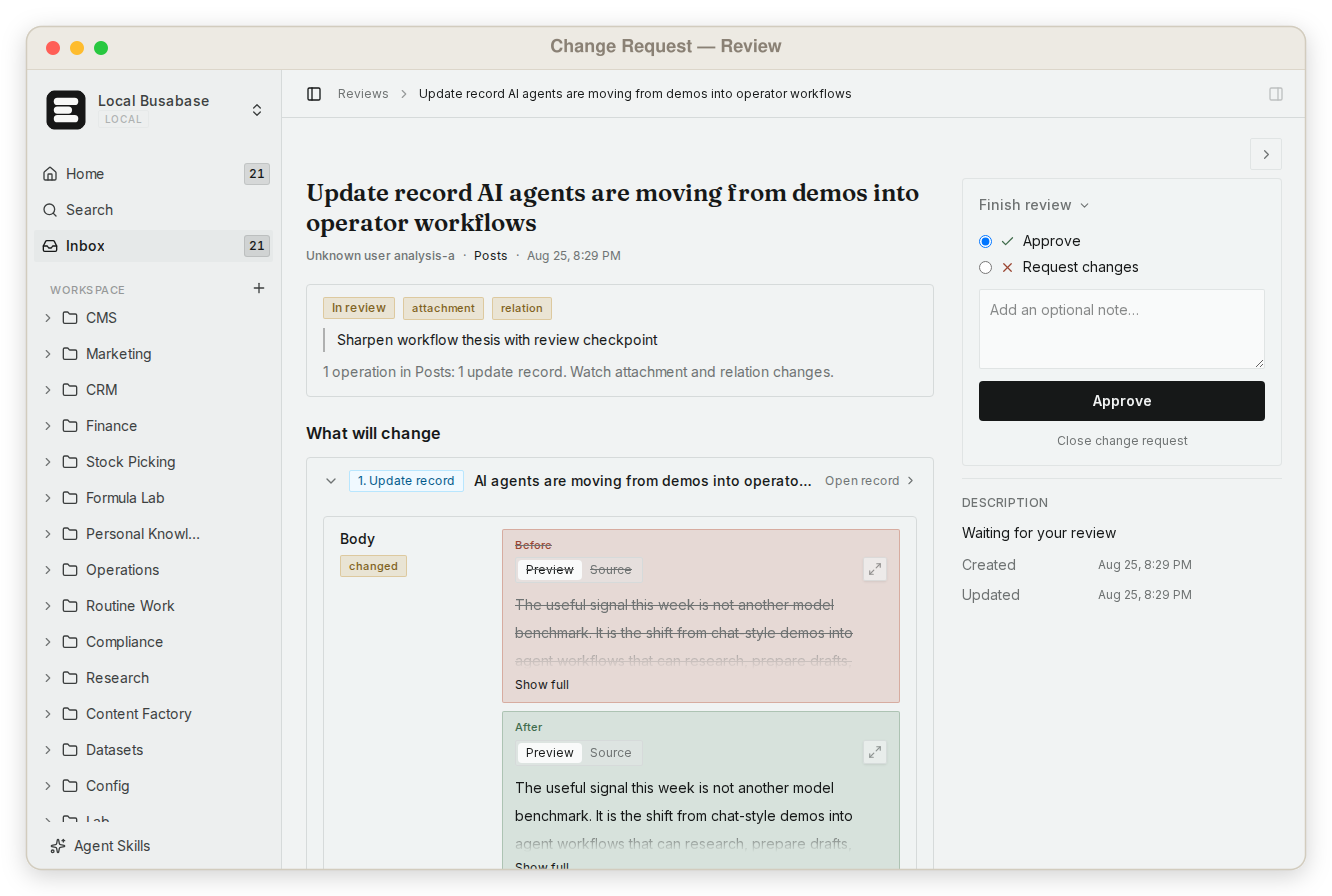
Put simply: Supermemory keeps track of what its engine has learned about a person. Busabase keeps track of what your team has decided — reviewed first if you want, reversible either way.
What else Busabase gives your agents and your team
A memory engine gives each agent better recall. Around that, a team needs a place to keep, see, and ship the work. In Busabase these come with the workspace.
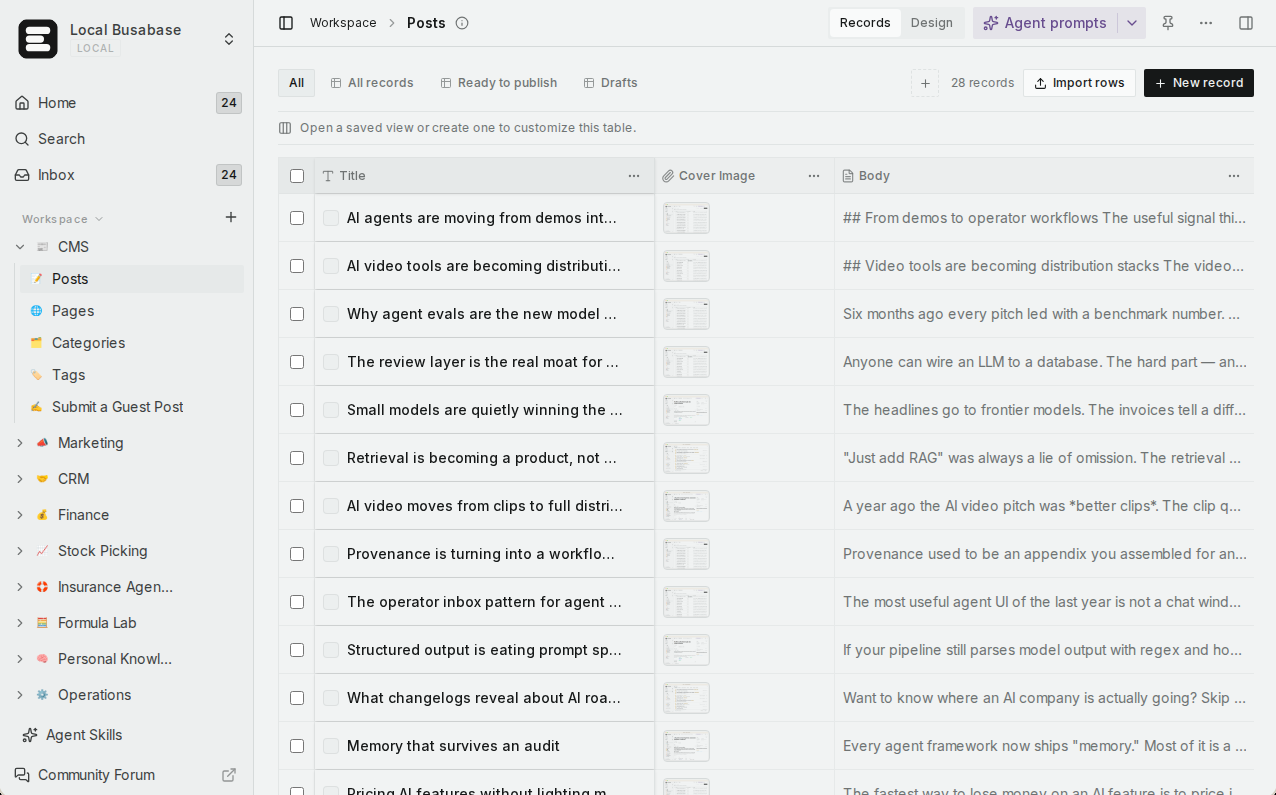
Tables people can actually read
One knowledge base for people and agents
Exact search with grep
Your Skills, shared
Apps on four engines
Websites with a backend and your domain
Roles for people, levels for keys
Connects to the agents you use
Open source, all of it
Comparison by the job you are trying to do
Each row is a job a team brings to these products. The last row is Supermemory's home ground, and the table says so.
| What you are trying to do | Busabase | Supermemory |
|---|---|---|
| See every change to team data before and after, and who made it | Built in — a Change Request with a message, field-level diff, author, the key or tool it came through, full history, and rollback | At the fact level: an updated memory keeps its earlier version, forgotten memories are preserved; the console keeps request logs |
| Let one agent propose changes without applying them | Yes — a proposal-only key; its changes wait in the Inbox for a person | A review queue for low-confidence inferred facts (approve, decline, undo); content you ingest is processed as it arrives |
| Let teammates read and correct what agents wrote | Yes — table, gallery, kanban, calendar, and Gantt views; edit in place | A console to browse documents and memories; facts change mainly by ingesting new content or forgetting old ones |
| Keep structured business records people can filter and look up | Yes — Bases with typed fields, saved views, and AND/OR filters | Its docs say it is “not your system of record”: no SQL, joins, or lookups by primary key over memories |
| Run a team knowledge base | Yes — Docs, files, and Bases in one tree with shared permissions | Shared MCP spaces hold a team's documents, memories, and profile context for its assistants to recall |
| Find exact text across everything | Yes — one regex grep across files, Doc bodies, records, and agent prompts, with line and context | Hybrid semantic search and graph traversal; its SMFS filesystem offers grep that is semantic by default |
| Give every agent the same team Skills | Yes — upload your Skills once; every connected agent reads the same version | Not a product feature (its official skill teaches coding agents the Supermemory API) |
| Turn the data into an app or a website on your domain | Yes — AirApps in the browser, on your machine, in a cloud sandbox, or as a website (custom domains on Plus and above) | Not a product feature |
| Invite teammates and agents into one workspace | Yes — read, write, or manage roles for members; agents join with their own keys | Organization members from Pro (3 seats; unlimited on Scale); per-tag access on Scale and Enterprise |
| Connect Claude Code, Codex, Cursor, and other agents | Yes — MCP, CLI, OpenAPI, webhooks, and agent plugins | Yes — a remote MCP with OAuth, and plugins for Claude Code, Cursor, Codex, OpenCode, and more on every plan |
| Predictable pricing as the team grows | Flat per seat — no metered overage | Monthly credits on each plan, then metered by tokens ingested, searches, and operations |
| Self-host the whole product, including offline | Yes — MIT, from a laptop to an air-gapped network | Supermemory local runs offline and is free up to 10,000 stored documents, but its server is not open source; self-hosted deployments are on Scale and Enterprise |
| Memory for your agents' users: extract facts, keep them current, recall them, sync Gmail, Drive, or Notion | Not its job — use Supermemory | Yes — this is Supermemory's home ground |
Coming next
These three are being built now and are not available yet. They are listed so you can plan; this page will change when they ship.
App users In development
Ontology In development
Fine-grained permissions In development
Supermemory's own docs draw the line
Supermemory is unusually clear about what it is for. Its rules page sorts information with a simple test: something “a colleague would remember” goes into memory; something looked up by meaning goes in as documents; but “Invoice #4821, total $1,340.50, status paid” belongs in “your database”, and an instruction like “Never quote internal pricing” belongs in the system prompt. It says it plainly: “Supermemory is not your system of record.”
That leaves two things for something else to hold: the records the business runs on, and the standing instructions every agent must follow word for word. Those are exactly what Busabase is for. Records live in Bases that people can filter and edit. Policies live in Docs, and the way your team works lives in Skills — one copy, read by every agent, changed only through a Change Request with an author and a diff.
Supermemory goes deep where it plays. Its graph links facts that update, extend, and derive from one another; memories are typed so preferences strengthen and episodes fade; and expired facts step aside without being erased. None of that is something Busabase tries to do. The two products fit because each one says, honestly, where it stops. For the longer version, read Agent memory vs knowledge base vs system of record.
Using them together
A split that follows each product's own advice:
- Keep customer records, price lists, policies, and the Skills your agents follow in Busabase. Every change, from a person or an agent, is a Change Request.
- Add Supermemory to the assistant or the coding agent, and connect the sources a person works in — Gmail, Drive, Notion — so it learns their context and preferences over time.
- When the agent needs the exact contract term or the current price, it reads the record from Busabase over MCP or the CLI instead of relying on recall.
- When a conversation produces something the business will be held to — a promised discount, a new contact, a changed plan — the agent writes it to a Base as a Change Request, and can send a one-line summary to Supermemory so the next conversation knows it happened.
A useful rule: if a colleague would simply remember it, put it in Supermemory. If someone will be held to it, make it a record in Busabase.
Pricing at a glance
Busabase
Plus: from $10 per seat per month (billed yearly). Pro: from $20.
Flat per seat, no metered overage. Self-hosting is free under MIT with no seat limit.
Supermemory
Pro: $19 per month, $20 of credits, 3 team seats. Max: $100, $130 of credits, Gmail connector. Scale: $399, $600 of credits, S3 and web crawler connectors, unlimited seats, self-hosted option. Enterprise: custom.
Credits are spent at the same rates on every plan — for example $5 per million tokens of plain-text memory and $5 per million searches — and only unique content is billed.
Prices as published on 13 November 2026. Supermemory's subscription credits reset monthly; top-up credits do not expire. See Busabase pricing and Supermemory pricing for current details.
Where Supermemory is the better choice
- Your product has to know each of its users. Profiles, facts that update and expire, and preferences that strengthen with repetition are what Supermemory's engine is built around; it reports 187 ms median server time for search.
- You want a person's own data to feed memory automatically. Connectors for Google Drive, Gmail, Notion, OneDrive, GitHub, Granola, Amazon S3, and a web crawler sync on their own, with webhooks for changes and a scheduled sync every four hours.
- You want memory inside the coding agents you already use. Plugins for Claude Code, Cursor, Codex, OpenCode, and others work on every plan, including Free.
Busabase's limits, plainly: it has no vector index, does not extract facts or build user profiles from conversations, and does not sync someone's inbox or drive into memory. It also has no realtime subscriptions, and sign-in for the end users of apps you publish is in development (App users), not available today. If your agent needs to remember its users now, run Supermemory alongside it.
Frequently asked questions
Is Busabase a memory engine like Supermemory?
Supermemory keeps old facts and lets you review inferences. How is a Change Request different?
Supermemory's MCP has shared team spaces. Isn't that a team workspace?
Does every agent write to Busabase need a human review?
Can I self-host Busabase? Can I self-host Supermemory?
Can one agent use both?
Next step
Connect an agent you already use and have it put one real piece of team knowledge into Busabase — a price list, a customer table, a Skill. Then ask it to change one thing, and open the Change Request it produces.
Related reading: All comparisons · Busabase vs Mem0 · Busabase vs Zep · Agent memory vs knowledge base vs system of record · How Change Requests work
Sources: Supermemory home page, Supermemory product page, Supermemory pricing, Graph memory (Supermemory docs), Review inferred memories (Supermemory docs), Memory operations (Supermemory docs), Rules of supermemory (Supermemory docs), Supermemory MCP overview (Supermemory docs), Supermemory local (Supermemory docs), Invite team members (Supermemory docs), Supermemory changelog, supermemoryai/supermemory on GitHub, Busabase pricing