Busabase × MCP
An MCP knowledge base with human approval
Busabase is a shared knowledge base that agents read and update through MCP. Every write lands as a Change Request: a message, a field-level diff, the author and the key it came through, full history and rollback. Human approval is there when you want it, set per agent key: give an agent a proposal-only (changeRequest) key, or have it pass autoMerge: false, and its Change Requests wait in the Inbox for a person to approve.
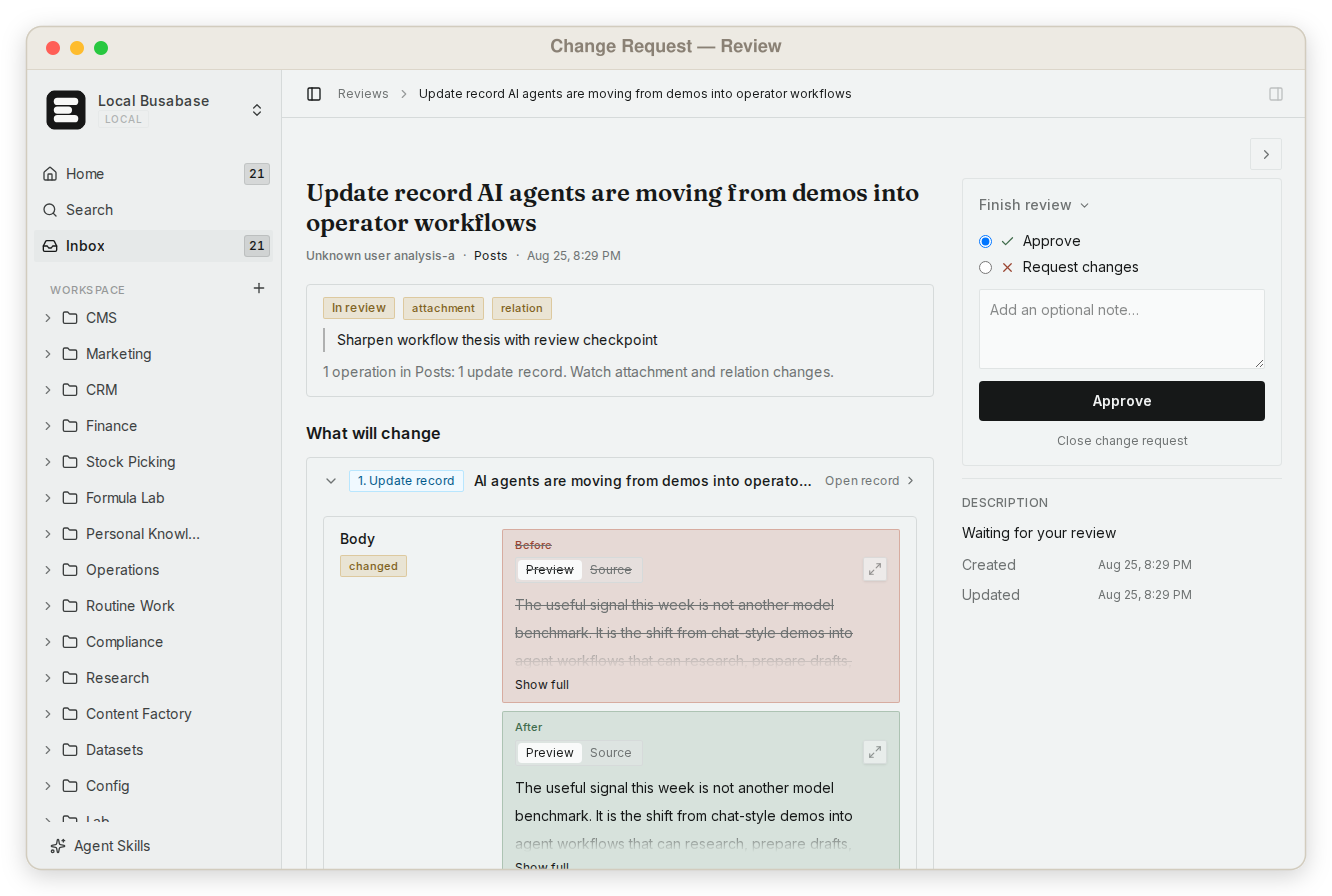
A Change Request in Busabase: what changed, who changed it and through which key. Approval is optional (English interface).
Human approval is set per agent key
MCP supplies tools; it does not make every tool result a verified fact. On Busabase Cloud, connect an MCP client to https://busabase.com/api/mcp with Streamable HTTP, finish browser OAuth and select the account, permission and expiration. Use read for inspection, changeRequest when a person should approve each change, and write for a trusted workflow. With write access a Change Request merges immediately, yet it keeps its diff, author, key and history and can be rolled back; a write-level agent can still pass autoMerge: false to hold one change for review. A write grant is broader access, not a guaranteed human-review queue. A prompt saying “ask first” is useful task guidance but does not narrow the credential. If your client cannot complete OAuth, use an API key with the same deliberate permission and expiry choices.
Choose authority for the task
read
Inspect existing records. Reading gives the agent context without granting record changes.
changeRequest
Every write waits in the Inbox as a Change Request. A person checks the evidence and scope, then approves it or requests changes.
write
Broader authority for trusted processes, including review and merge capabilities. Changes merge at once and still arrive as Change Requests you can inspect and roll back.
From a task result to shared knowledge
- 0101
Read before proposing. Call auth_verify, select the intended Space, and inspect the current record and its head version. Keep the source URL, relevant excerpt and effective date with the claim. Do not silently replace a different workspace’s record.
- 0202
Propose a bounded change. For example, ask the agent to update one supplier’s delivery lead time from a revised contract. Include the old value, proposed value, exact contract reference, affected scope and unresolved questions. The example is a workflow design, not a measured integration result.
- 0303
Review the field diff. The reviewer checks the contract version and scope, accepts supported fields or requests a narrower corrected proposal. If the contract is only a draft, reject the factual update. Do not treat a successful MCP call or an agent’s summary as acceptance.
- 0404
Merge and read back. After authorized review and merge, read the canonical record again and verify the accepted value. If the head changed while the agent worked, inspect the intervening changes and revise the proposal instead of overwriting them. The next task reads the accepted version with its sources.
An acceptance record worth reusing
A reusable supplier record can carry supplier_id, service_region, lead_time_days, source_document, source_version, effective_at and evidence_status. Assign a responsible reviewer and use the ChangeRequest and commit history to trace the decision. Before acceptance, the revised delivery time remains a proposal; a rejected change does not become the current value. MCP makes the record accessible to the next agent, but does not automatically import its chat history, fetch every linked attachment or build a vector index.
Official documentationChangeRequest
On a proposal-only key, the change stays a proposal until a person approves it. Write-level changes merge at once and stay reversible.
Illustrative workflow — not an agent product screenshot.
Inspect the proposal before it becomes knowledge
Illustrative supplier example — invented values, not a real customer record.
- 01Current accepted record: lead time 10 days; contract v2; region EU.
- 02Proposed update: lead time 7 days; contract v3; effective date must be checked.
- 03Review decision: v3 is unsigned. Reject the update; the accepted lead time stays 10 days.
Where held changes wait: the Inbox
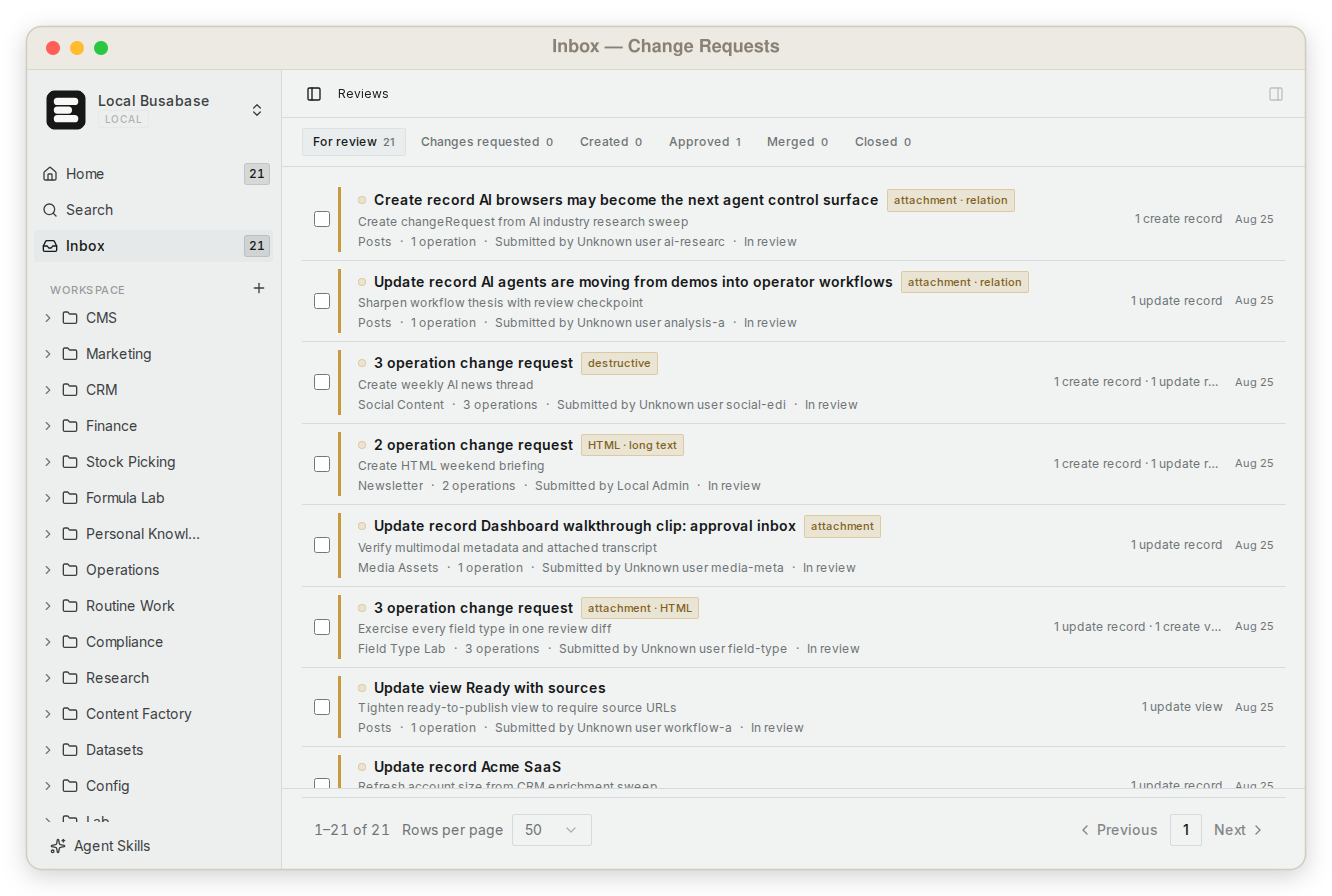
When the record changes during investigation
Read before proposing
Capture the current record and version alongside the evidence you investigated.
Compare the intervening change
If another task updated the same field, inspect its evidence and revise your proposal against the current value. Avoid replacing it with an older snapshot.
Reread after merge
Retrieve the accepted record, verify the intended fields and give the next task that record reference. A proposal receipt alone does not establish the accepted value.
Practical questions
Does connecting MCP automatically enforce human review?
No. Choose changeRequest permission when an agent should read and propose without deciding the merge. A write-level grant can perform broader operations. Review the actual credential and workspace access rather than relying on the wording of a task prompt. Either way, every write is recorded as a Change Request with its diff, author and key.
What should a reviewer check?
Check the changed fields, source document and version, applicable customer or region, effective date and open questions. Confirm the change belongs to this record. Return a correction request when the evidence is incomplete; reject a claim that the source does not support.
What happens if another agent updates the record first?
Read the latest record and compare it with the version used for the proposal. Resolve competing changes explicitly and submit a revised proposal where needed. Do not make the earlier version authoritative merely because the first agent started earlier.
Can any MCP client connect?
The client must support a compatible transport and authentication method. Busabase Cloud offers Streamable HTTP with OAuth, or an API-key alternative. Use the client-specific connection guide; a client that only accepts unauthenticated servers cannot directly use the authenticated Cloud endpoint.
Is this a replacement for RAG or a search engine?
It is a versioned record layer: every change is a Change Request you can inspect, approve or roll back. It does not promise automatic embeddings, universal document ingestion or a retrieval pipeline. Keep your existing search or retrieval system where needed, and use the accepted record and its source links as the accountable knowledge artifact.
Start with one bounded knowledge update
Start one agent on a proposal-only key and widen it to write access once you trust the workflow. Either way, every change keeps its diff, author, key and history.
Connect your agent