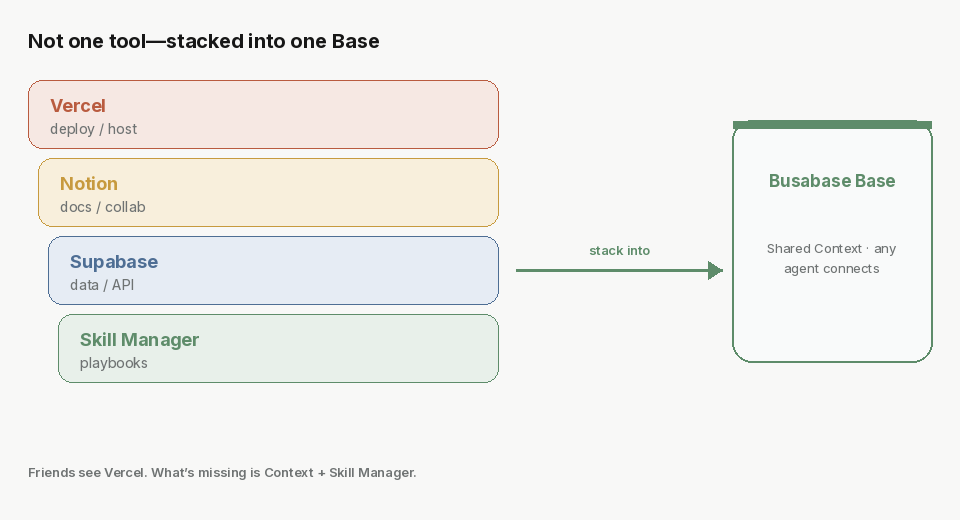
Busabase = Vercel + Notion + Supabase + Skill Manager.
Friends think Busabase is just Vercel. The sharper equation: deploy + docs + data + Context + Skill Manager—so any agent can continue, not one vendor session.

Busabase = Vercel + Notion + Supabase + Skill Manager
On a walk, friends asked: isn’t Busabase just deploying a website—pretty much like Vercel? And how do Agents actually cooperate? I already use Cursor, Codex, OpenClaw… I can stitch a stack myself.
The question isn’t whether you can ship a page. It’s whether the next agent can continue the work—or whether everything is locked again inside one laptop and one vendor session.
A sharper line:
Busabase ≈ Vercel + Notion + Supabase + …… + Context + Skill Manager
Not any one of those tools alone. Stacked together, it becomes the shared foundation people and agents work from.
The old mistake: you think you’re “deploying”; you’re buying lock-in
The familiar pipeline:
Build a site → deploy on Vercel → wire a database → park HTML and files somewhere → collaboration means buying auth and sharing → you get stuck assembling vendors.
That stack answers: can a human open the site?
It does not answer: if I switch models, can I pick up the same half-finished project?
If the session lives only in Codex, and the Skill lives only on this laptop’s agent, then when you’re out without a computer, out of quota, or you want Muse / Cursor / another agent—you’re not calling “the same work.” You’re calling private memory and local files. That isn’t collaboration. That’s moving house.
Switching models is easy. What’s hard is a Skill locked on one machine.
Unpack the equation: every layer you’ve already been missing
Friends reach for Vercel because they see the “it can go live” layer. Unpacked:
| Layer | What you think you’re buying | What’s actually missing |
|---|---|---|
| Vercel | Deploy / host / open a page | Workspace identity and hosting—not only a human-facing static site |
| Notion | Docs, wiki, shared boards | Docs agents can cite—not pages only humans skim |
| Supabase | Database / API | Structured records and relations—facts the next agent can read |
| Skill Manager | (most stacks never have this layer) | Playbooks / Skills: operating manuals in a shared base every connected agent looks up before it acts |
| Context | (scattered across chats and laptops) | Project context that isn’t bound to one vendor session |
Put together, that’s the product line:
The System of Record for AI Agents
Different agents. One shared base.
You open a Base and tell the connected agent: initialize, connect. Skills, docs, and apps land in one workspace node tree. Identity and permissions are part of the workspace—who signs in, who is read-only, whose writes need review—not three more SaaS bills bolted on afterward.
Why Context + Skill Manager is what makes model-switching real
Agents have no memory. That isn’t a bug; it’s the point. Sessions and models can change. What remains are structured records, docs, Skills, and apps. Playbooks collect Skills into a catalog every connected agent can look up before it acts.
A concrete example:
A stock-trading Skill that only exists on this laptop—OpenClaw can use it; Muse cannot.
Put the Skill in the Base—OpenClaw and Muse both can. You switch AIs without binding the half-done work to one vendor.
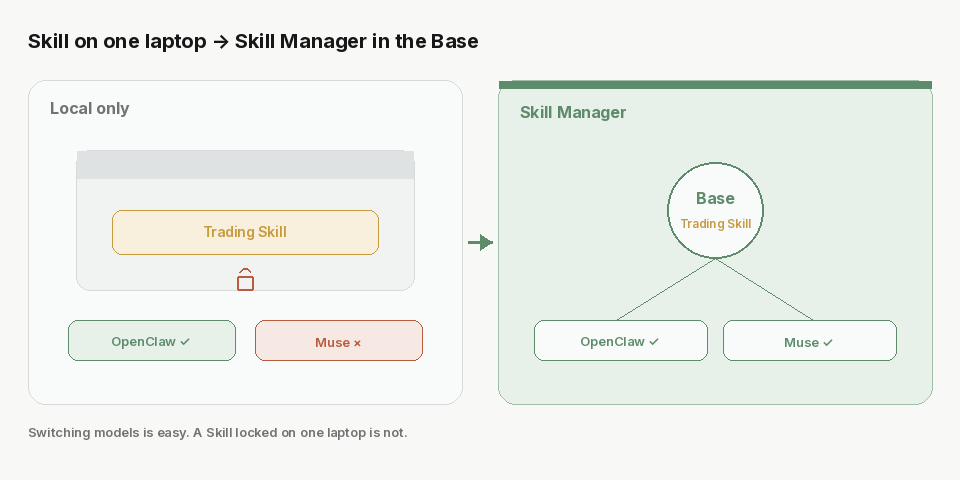
Same for a company of many people: many different Agents, one shared set of Skills and one shared set of facts. Collaboration isn’t mysterious “agent-to-agent meetings.” In most products, that still means a shared chat session. What survives across tools and people is a shared system of record—Context in the base, Skill Manager for the manuals, not one vendor’s chat log.
Don’t be fooled by “drop a memory file into the AI.” A file trapped in one agent’s private context locks you in—price hikes, tool switches, new sessions all charge a migration tax. The claim is simple: don’t bind memory to one AI; bind it to a shared base any agent can connect to.
How writes stay safe: Change Requests, not silent mutations
Share without control, and the workspace becomes an unauditable swamp.
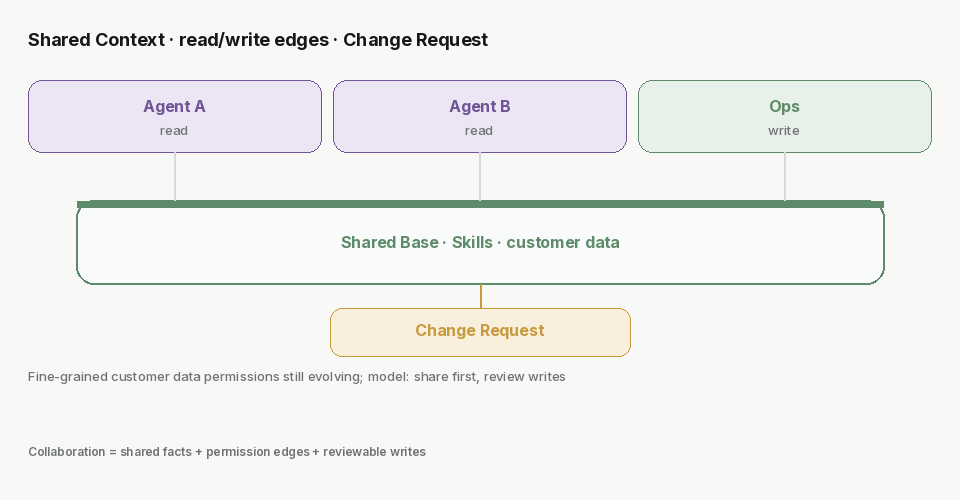
Busabase’s loop: the agent reads workspace context → every write is a Change Request (message, field-level diff, author, history) → permissions decide merge-now or Inbox review → changes stay inspectable, attributable, reversible.
Agent reads the workspace (Context + Skills)
        ↓
Writes data / docs / Skills / app changes → Change Request
        ↓
Permissions: merge now, or wait for review
        ↓
Inspectable · attributable · reversible
That’s collaboration that holds when many agents touch the same store: not stuffing memory into one vendor, but leaving facts and methods where people and agents can open them.
Permissions: the direction is clear; fine grain is still evolving
Cloud already has Spaces, roles, identity, and boundaries like “write merges now” vs “propose Change Requests only,” plus node ACLs. Ops patterns—one folder per customer, most agents read-only, a smaller ops agent allowed to write—are exactly the data-permission direction we’re finishing.
Honesty check: fine-grained “who may see which customer’s data” is still being completed. Don’t market it as finished. The model is already clear: shared Skills and shared facts first; permissions pin read/write and review edges; Change Requests make every write reviewable.
How this differs from “buying another Vercel”
| Single tools (Vercel / Notion / DB…) | Busabase (stacked) | |
|---|---|---|
| Primary delivery | Pages, docs, or tables alone | Records, docs, Skills, and apps people and agents share |
| Switch model / agent | Sessions and local playbooks often re-explained | Connect to the same Base; Context + Skill Manager remain |
| Collaboration | Buy auth, sharing, permissions separately | Workspace identity + permissions + Change Requests |
| Agent memory | Easy to lock into a vendor session or laptop files | Agents stay stateless; work stays in the workspace |
Keep using Vercel for sites, Notion for human drafts, Supabase for a class of APIs. Those are different jobs.
Busabase’s job: stop scattering the Context and Skills agents work with across chats and local disks.
Next
Open busabase.com, create a Base, put a Skill you already use into it, then connect a different agent—and see whether it can continue without you re-explaining the project.
Related: Stop building software AI can't read. · What Busabase solves