Everyone Is About to Have Their Own Database
Build yours with the open-source Busabase edition: real install steps, a prompt to hand your agent, and a base your agents can read, write, and learn from.

On October 30, YC's Lightcone podcast sat down with Paul Copplestone, co-founder and CEO of Supabase, under a title that doubles as a prediction: "Why Everyone Is About To Have Their Own Database". The numbers behind the prediction are hard to argue with. Supabase now has 13 million signups, up from roughly 3 million a year ago. It spins up over a million new databases a week, and the databases under its management are approaching 50 million, from 8 million a year earlier. About 70% of the new activity, the hosts noted, comes from agents rather than people.
Copplestone's explanation was simple: "You want to own your own database and then build all the applications or agents on top of it" — the database is the store of record, the thing that stays valuable while apps and agents come and go.
The same episode shows what that looks like at personal scale. YC partner Harj Taggar described the personal system he has been building for himself — email triage, finances, and health tracking in one place — and how he is deliberately pulling his CRM out of any single agent, "so that if I want to attach different agents on top, then I can use any agent." His verdict: "I would never have thought about wanting a personal database, like, a year ago… but now, like, that's actually, like, the most valuable thing." And Garry Tan's GBrain — his personal agent brain, built on top of Supabase — exists for the same reason: an agent that can only see its current context window will keep re-asking questions you already answered.
We agree with the thesis. This guide is about the layer it leaves out.
A database is storage. A personal database has to be a workplace.
A Postgres database is built for applications to read and write. That is exactly what you want underneath software. It is not what you, personally, work in — and it is not what your agents should be dropped into raw, either.
What a person and their agents actually touch every day is a different layer: people, meetings, decisions, projects, lessons. These are records, not rows in a schema you have to memorize. They need to be readable by you at a glance, writable by any agent you connect, and — once more than one writer exists — reviewable, with an author and a history attached to every change.
That is the layer Busabase is. It is not a Postgres replacement — Busabase itself runs on Postgres or on an embedded database called PGlite, and its README says so plainly: it is the workspace on top, not a replacement for your app's database. Keep your app data where it belongs. For the record layer your agents live in, you don't need to assemble Postgres, a vector store, and a graph layer yourself. The open-source edition of Busabase installs as that layer, in one command.
Install it: one command, no database to set up
On your own machine:
npx -y busabase@latest server
Then open http://localhost:15419/dashboard/local. There is no database, account, or config to prepare: the server starts with the embedded PGlite database, local file storage, and a demo workspace you can explore or clear. Your data lives on your machine, in ~/.busabase/data/.
Prefer another shape? The same open-source edition also runs as Docker (docker run --rm -p 15419:15419 -v ~/.busabase/data:/data busabase/busabase), as a global install (npm i -g busabase, then busabase server), or as a native Desktop app for macOS, Windows, and Linux from busabase.com/download — all MIT-licensed, all the same engine that powers Busabase Cloud.
One boundary, stated by the project itself and worth repeating before you go further: the open-source server is designed for a trusted local machine or a private network. Do not expose its write endpoints to the public internet without authentication and a reverse proxy. A personal database earns its keep by being yours — keep it that way.
Hand the setup to your agent: the copy-paste prompt
Here is the part GBrain's INSTALL_FOR_AGENTS.md got right, and that this article follows: in 2026, the person reading install docs is increasingly an agent. So instead of a page of manual steps, here is one prompt. Paste it into the agent you already use — Claude Code, Codex, Cursor, or any agent that can run commands and read a URL — on the machine where you want your personal database to live:
You are my setup agent. Install Busabase on this machine and build my personal
database in it. Use only the official paths below — do not improvise commands
or schema, and stop and report if a step fails instead of working around it.

1. Start the server if it is not already running:
   npx -y busabase@latest server
   The dashboard lives at http://localhost:15419/dashboard/local. It needs no
   account and no database of its own — it starts with an embedded database
   and local file storage.

2. Read and follow the Busabase Agent Skill. It is the single source of truth
   for connecting to this workspace:
   http://localhost:15419/SETUP_SKILL.md
   Use busabase-cli against the local server (http://localhost:15419) for
   every workspace change.

3. In this workspace, create a folder called "Personal Base" containing:
   - Base "People": Name · Role · Organization · Contact link · Context ·
     Last contact date
   - Base "Meetings & Decisions": Title · Date · Attendees (linked to
     People) · Decisions made · Why · Follow-ups
   - Base "Projects": Name · Status · Owner · Key decisions (linked to
     Meetings & Decisions) · Next action · Links
   - Base "Experience": Lesson · Source record · Applies when · Does not
     apply when · Status (Candidate / Adopted / Retired)
   - Doc "How I work": what belongs in this base, what never goes in, and
     what always waits for my approval — money, commitments, and dates
   - Skill "Personal Base operator": before every task, check People,
     Meetings & Decisions, and adopted Experience; after every task, write
     the result back with its source; never create a second People record
     for a contact link that already exists — update the existing one

4. Verify your work: list the new nodes back to me and read one record from
   each Base, so I can see the structure exists. Report the dashboard URL,
   what you created, and the first thing I should check.

5. Never choose a merge policy yourself — submit each change and let my
   permissions decide whether it merges now or waits for my review. Never
   store a password, token, or any secret in any record.
Everything in that prompt uses official mechanisms only: the server command and the setup Skill are from the project's README, and the structure is the blueprint in the next section. What the prompt buys you is division of labor — the agent does the repetitive construction, you do one verification pass at the end.
The blueprint: what a personal base actually holds
This is a starter design, deliberately small. Four Bases, one Doc, one Skill, in one folder:
| Node type | Suggested name | Essential fields / content | Purpose |
|---|---|---|---|
| Folder | Personal Base | — | Groups everything below in one place |
| Base | People | Name · Role · Organization · Contact link (the dedupe key) · Context · Last contact date | One record per person; agents identify people by contact link, never by name alone |
| Base | Meetings & Decisions | Title · Date · Attendees (→ People) · Decisions made · Why · Follow-ups | Decisions and their reasons survive outside the chat they happened in |
| Base | Projects | Name · Status · Owner · Key decisions (→ Meetings & Decisions) · Next action · Links | A new agent reads this instead of being re-briefed |
| Base | Experience | Lesson (one sentence) · Source record · Applies when · Does not apply when · Status: Candidate / Adopted / Retired | Corrections become reusable judgment instead of one-off fixes |
| Doc | How I work | What goes in, what never goes in, approval rules for money, commitments, and dates | The standards you hold; agents read before acting |
| Skill | Personal Base operator | The daily loop, writeback rules, dedupe key, failure list, report format | The repeatable method every connected agent follows |
Two design choices do most of the work. First, decisions get their own record with a "Why" field — six months from now, the decision matters less than the reason, and the reason is what chats forget. Second, Experience has an adoption gate: an agent proposes lessons as Candidates; only the ones you confirm become Adopted, and only Adopted ones are read at the start of every task. That gate is what keeps a personal database from filling up with confident nonsense.
A small example of the loop closing (illustrative): on Monday at 9:00 your agent reads last week's meetings and drafts your priorities into chat. You reply: "Move the vendor call to Thursday — never schedule external calls on Monday mornings." The agent reschedules, writes the change back to the meeting record, and files a Candidate in Experience: "No external calls on Monday mornings." You mark it Adopted. Next Monday, the draft already respects it — and when you switch agents in three months, the new one respects it too, because the lesson lives in the base, not in the old agent.
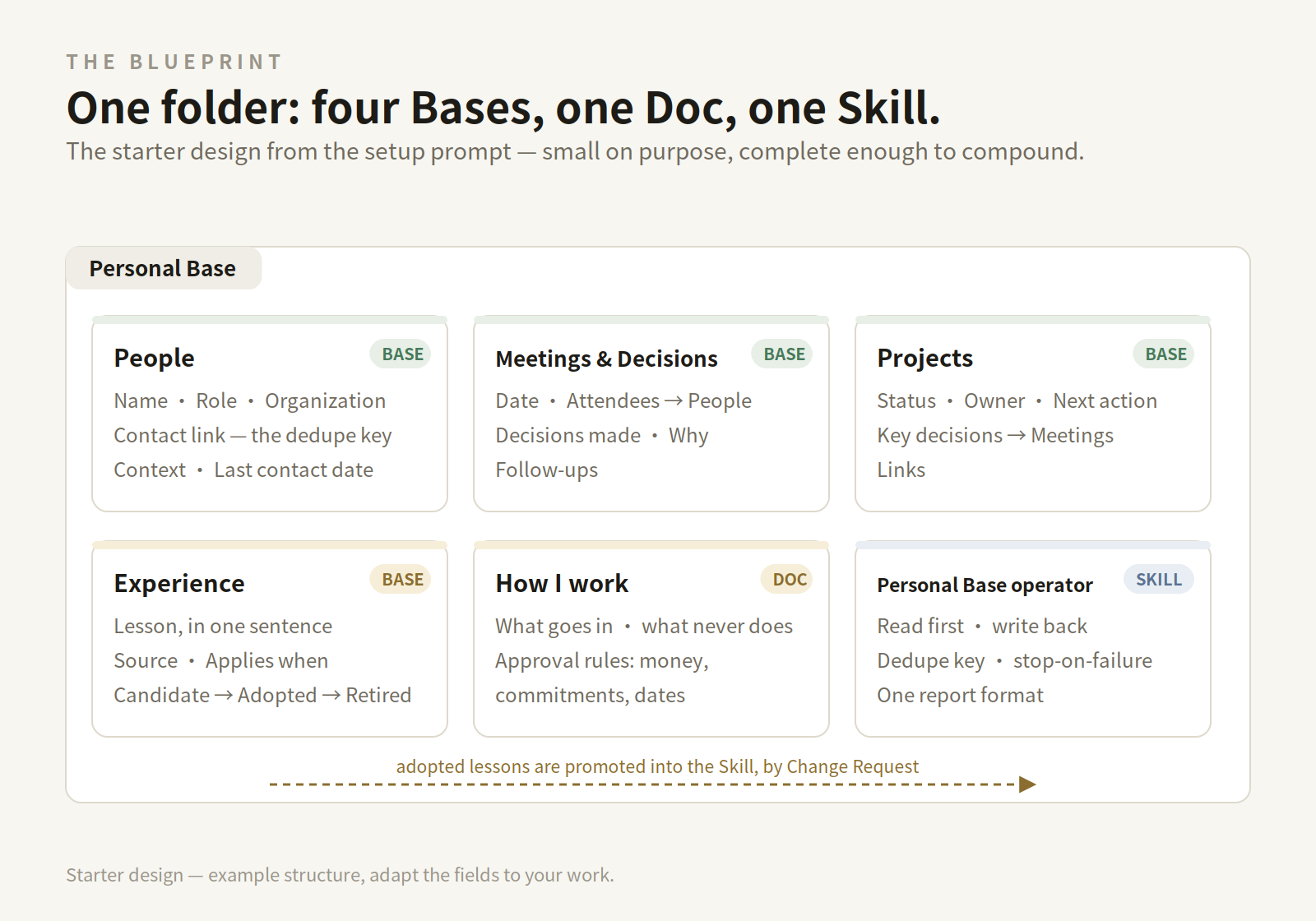 The starter blueprint. Example structure — adapt the fields to your own work.
The daily loop: read first, write back, keep the receipts
A personal database only compounds if the loop runs every day. Keep it to three moves — observe, decide, act:
- Before work, the agent reads. Today's open follow-ups, the relevant people and decisions, and the Adopted experience. This is the "never re-ask a question I already answered" step: the answer is usually already in the base.
- Proposals come to chat; you decide. The agent brings a draft — a brief, a reply, a plan — and you agree, adjust, or reject. Money, commitments, and dates always stop here, per your Doc.
- After work, the agent writes back. The outcome lands in the record it belongs to, with its source, so tomorrow's run — and next year's agent — reads what actually happened, not what was planned.
Writes in Busabase travel as Change Requests: every change carries a message, a field-level diff, an author, and a history. With one person and one agent on a local install, most changes merge on the spot — but the diff and the history exist either way, so "what changed, and who changed it" is always answerable. If a write fails, the rule from the setup prompt applies: stop and report, never improvise around the failure.
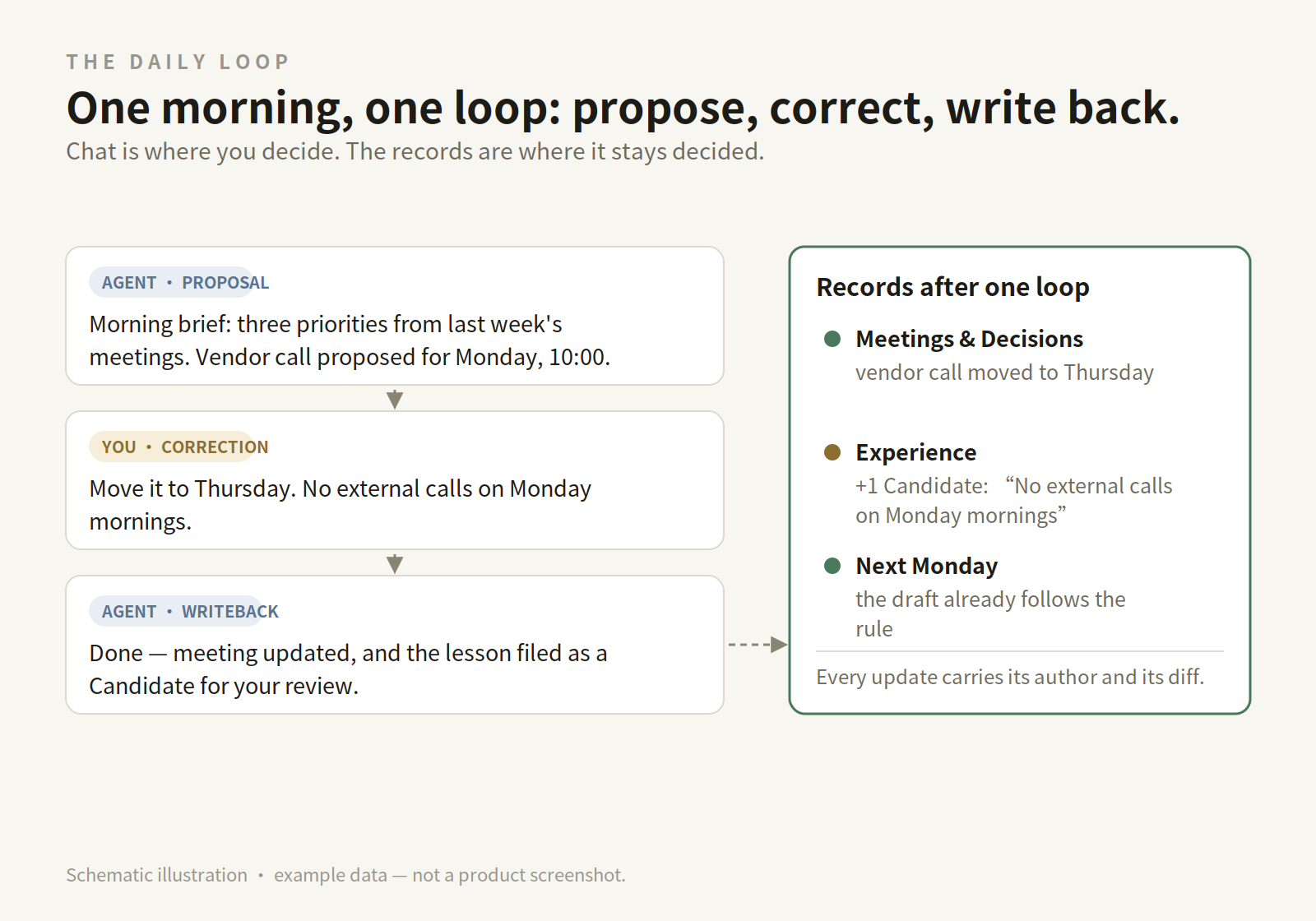 One loop, start to finish. Schematic illustration with example data — not a product screenshot.
When it grows: teams, enterprises, and several agents at once
The personal database is where the pattern starts, not where it ends. The moment a second person — or a second agent with a different job — joins, four pains show up in a predictable order:
- Two writers, two truths. One agent's notes live in its chat, another's in a document somewhere. Nobody can say which version of a decision is current.
- Changes without an author. A record changed overnight. Was it the research agent, the scheduling agent, or a person? Without provenance, every surprise becomes an investigation.
- Re-briefing every new agent. A new tool means explaining the project again, because the knowledge lived inside the previous agent.
- Everything visible to everyone. The finance rows and the intern's sandbox sit in the same place, because a personal setup never needed a boundary.
These are precisely the pains the shared form of the same system addresses. Busabase Cloud runs the identical engine as a hosted, multi-user workspace: Spaces with roles and permissions decide who — person or agent — can see and change what. Change Requests become the collaboration protocol: every change carries a diff, an author, and a history; a key with write access merges at once, and a credential can be capped so that an agent can only propose, never apply — its changes wait in the Inbox for a person to review. Skills written by one agent sit in a shared Playbooks catalog that every connected agent can look up before it acts. And if your data should stay on your own machine, Cloud Connect links a local workspace to the Cloud through an authenticated tunnel — your machine keeps the data and runs the local agents.
The operating pattern for several agents is then simple to state: one shared base, many stateless agents. A research agent drafts, an execution agent acts, a person approves what matters — each reads the same records and leaves its work in the same place. Agents can be swapped without a knowledge handover, because the handover already happened, continuously, in the base. Ten agents with no shared memory is not a team; one base that all of them read and write is what makes them one.
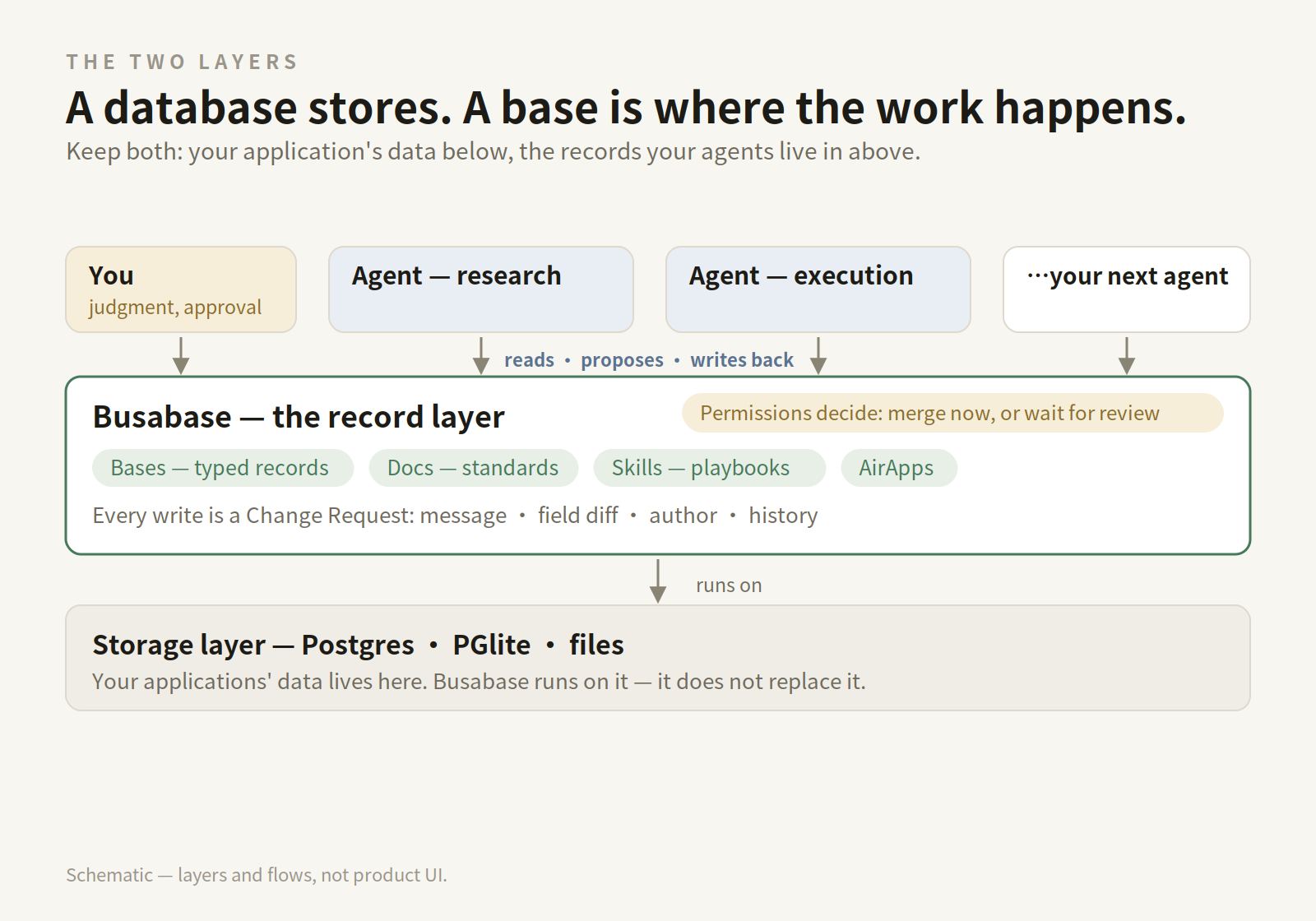 Databases store. The record layer is where the work happens — and the two layers compose rather than compete.
What does not belong in your personal database
The episode's own examples — finances, health, relationships — are exactly why a personal database needs boundaries, not just capacity:
- No secrets, ever. Passwords, tokens, and recovery codes do not go in records. Store a pointer to where a thing is kept, not the thing.
- References, not bulk copies. A contract or a medical file can be linked or attached under your control; don't paste sensitive full text into fields that agents will quote back into chats.
- Sensitive categories get explicit scope. If you track health or finances, decide which agent may read those Bases at all — and write that decision into your "How I work" Doc.
- Judgment stays with you. Anything involving money, commitments, or dates is proposed by agents and decided by you. The base's job is to make that decision informed and recorded, not to automate it away.
Start with one week of meetings
You don't need a migration project. Install the server, paste the prompt, and put one real week into it: the people you met, the decisions you made, one lesson you corrected. By the second week, ask a different agent than the one that set it up: "What did we decide last week, and why?" If it answers from the base — it will — you have the thing the Lightcone episode was pointing at: a database of your own, that your agents can actually work in.
- Code and self-hosting: github.com/busabase/busabase
- Desktop edition: busabase.com/download
- Start from a template instead: busabase.com/templates
- Docs: busabase.com/docs