ChatGPT Space and Dots put agents in your documents. Who reviews what they write into your records?
OpenAI's Space and Dots make agents real teammates in shared pages. Accept/undo and auto-review cover prose and actions. The facts other agents read as true need something else.

Updated 13 November 2026: rechecked every ChatGPT Space claim against OpenAI's own pages. Quotes now come from OpenAI's documentation, release notes and pricing page rather than press coverage; Slides has been rolling out since 16 October; dots come with Pro and Business Premium seats; and two press-only details (a "standing instructions" quote and "pricing not disclosed") were replaced with what OpenAI documents. The Busabase section now reflects that every write is a Change Request and review is optional.
On 29 September 2026, at DevDay, OpenAI made agents full teammates in the document. People, ChatGPT, Codex and a new kind of always-on agent called Dots now work in the same pages, at the same time, in a product called ChatGPT Space.
That is a real step, and it deserves to be taken seriously on its own terms. It also leaves a question on the table that is easy to miss in launch week. A document is where agents talk to you. A record is what the next agent, the Monday report or the customer-facing app reads as fact. Space answers the first very well. This post is about the second.
What launched
- Space is the team's home in ChatGPT. OpenAI's documentation says "ChatGPT Space brings your pages, slides, files, and shared work into one place." It holds Pages (editable documents), spreadsheets, Sites ("websites and tools you build with ChatGPT"), images and uploaded files. According to the release notes, "Space replaces Library for accounts with access," and Slides, which lets you "create presentations and keep working on them with your team in Space," began rolling out on 16 October.
- Dots are always-on agent coworkers. OpenAI's release notes introduce dots as "always-on agents in ChatGPT that can take on ongoing work and keep making progress between conversations," adding that "your dot has its own cloud computer and can bring results back for your review." In a page, you can "tag ChatGPT, Codex, or your dot to work through changes," and "for recurring updates, set up an automation with instructions for what to update, which sources to use, and how often to run."
- Everyone edits the same page, live. The Pages guide says you can "share the page with edit access to write together in real time," and the release notes add that collaborators work on the same Page "with each person using their own ChatGPT." "When available, select Show attribution to see who contributed."
- Generated text is reviewed in place. From the Pages docs: "Review the generated text in place. You can accept it, ask for a change, or undo it."
- A dot's consequential actions get an automatic check. OpenAI's dot controls page says: "Before your dot takes an action that could affect your accounts or share information, an automatic review checks it against your instructions, permissions, custom rules, and built-in safety requirements." Custom rules "can give your dot permission for particular actions, require it to check with you, or prevent it from taking an action."
"Space is available for ChatGPT Pro, Business, and Enterprise plans," on the web and in the desktop app. On ChatGPT's pricing page, dots come with Pro and with Business Premium seats ($100 per seat per month billed annually); OpenAI's release notes describe Enterprise access to dots as "a beta" that "is off by default."
What OpenAI got right
Most "AI in your docs" features so far have been a button: select text, get a rewrite, paste it back. Space goes further than that. It makes the agent a participant in shared work instead of a tool one person holds.
Three design choices stand out:
- Shared context instead of private chats. Each person brings their own ChatGPT, but everyone works against the same page. That removes the most common failure of team AI use, where five people get five different answers from five separate conversations and nobody knows which one made it into the plan.
- Review sits where the text sits. Accept, ask for a change, or undo, in place. You judge generated prose in its context, not in a side panel. That is the right shape for writing.
- Autonomy with a check in front of it. The automatic review, combined with custom rules that can permit, gate or prevent actions, is a genuine pre-execution control. Always-on agents with their own computer need exactly that, and OpenAI documents it alongside dots rather than leaving it implied.
For a team whose output is mostly prose (plans, briefs, meeting notes, launch docs), Space is a strong default, and many teams will not need anything more.
Documents are where agents talk. Records are what agents read.
Now follow one piece of work past the page.
Imagine a Dot with an automation that watches the sales channel and keeps the account plan current. On Tuesday it writes that the customer's renewal date moved to March and the contract value is $84,000. The account owner sees the paragraph, it reads fine, and she accepts it.
That paragraph is now doing two jobs. For the humans in the page it is prose: context, easy to reread, easy to correct in conversation. For everything downstream it is a claim. The forecast agent reads the renewal date. The finance report reads the contract value. A Codex job that builds the renewal dashboard reads both. None of them sees the paragraph the way the account owner did, and none of them knows it was accepted in four seconds between meetings.
The two review mechanisms Space describes are real, but they are aimed at different things:
| Mechanism | What it reviews | When | The question it answers |
|---|---|---|---|
| Accept / undo in place | Generated text in a page | After generation, before you keep it | Does this read right? |
| Automatic review + custom rules | An action a dot is about to take | Before the action runs | May this agent do this? |
| Record-level review | A changed field value, with its source | Before the value becomes canonical | Is this value true, and who decided? |
The first two are described in OpenAI's documentation. As of 30 September 2026, and again when we rechecked on 13 November 2026, the third is not: we found no description of structured records with a schema, of a field-level diff or proposal-and-merge for agent writes, or of version history for pages. Pages can contain tables, so structure is possible. What is not described is a place where a changed value arrives as a proposal, with its old value, new value and source, before anything reads it as true.
That is not a flaw in a document product. Documents are optimized for being read by people, and a person reading a page brings their own judgment. The gap appears when the next reader is not a person.
Which agents?
The second open question is about who is in the room. Space is built around people, ChatGPT, Codex and Dots. As of 13 November 2026, OpenAI's Space pages do not describe a public API or MCP access that lets agents from other vendors read or write Space content.
That is a reasonable launch scope. It is also different from how many teams work today. A typical engineering or operations team in 2026 runs several agents: Claude Code in the repo, Cursor in the editor, Codex for background jobs, a ChatGPT workspace for research, and a scheduled agent or two on top. If the facts those agents depend on live in one vendor's workspace, the other agents either cannot reach them or reach them through copies.
What to do this quarter
Space will be in many teams' hands within weeks. Before agents start writing into it at volume, four decisions are worth making on purpose:
- Sort outputs into prose and records. A launch brief is prose. A renewal date, a price, a headcount, an approved vendor list, a policy threshold: those are records, even when they first appear in a paragraph. Write the list down; it is shorter than you expect.
- Give records a schema'd home with provenance. Facts that other agents consume should live in fields, with the source that supports them and the agent or person that proposed them. A paragraph can link to the record; it should not be the record.
- Review in proportion to consequence. Do not put a gate on every write. People start approving without reading, and then nothing is really reviewed. Keep a diff and history on everything, and gate only the writes that matter: values that change money, commitments, compliance or what a customer sees. Let everything else stay fast.
- Keep the system of record agent-neutral. Use whichever agents do the best work for each job, including Dots. But the place your facts live should accept writes from all of them under the same rules, so switching or adding an agent does not mean moving the truth.
Where Busabase fits
Busabase is an open-source (MIT) database and workspace where agents and people share the same data, docs, skills, and apps. Every change keeps its history, and the writes that matter can wait for a person to review.
It is meant to sit next to a tool like Space, not replace it. Keep writing, planning and discussing in pages. When a piece of work produces a fact other agents will read, send it to a Busabase record. There, every write is a Change Request: a message, a field-level before-and-after diff, the author and the key or tool it came through, full history, and rollback. That is decision 3 above, built in: writes with write access merge immediately and still keep their diff, while an agent holding a proposal-only key has its changes wait in the Inbox until a person approves them.
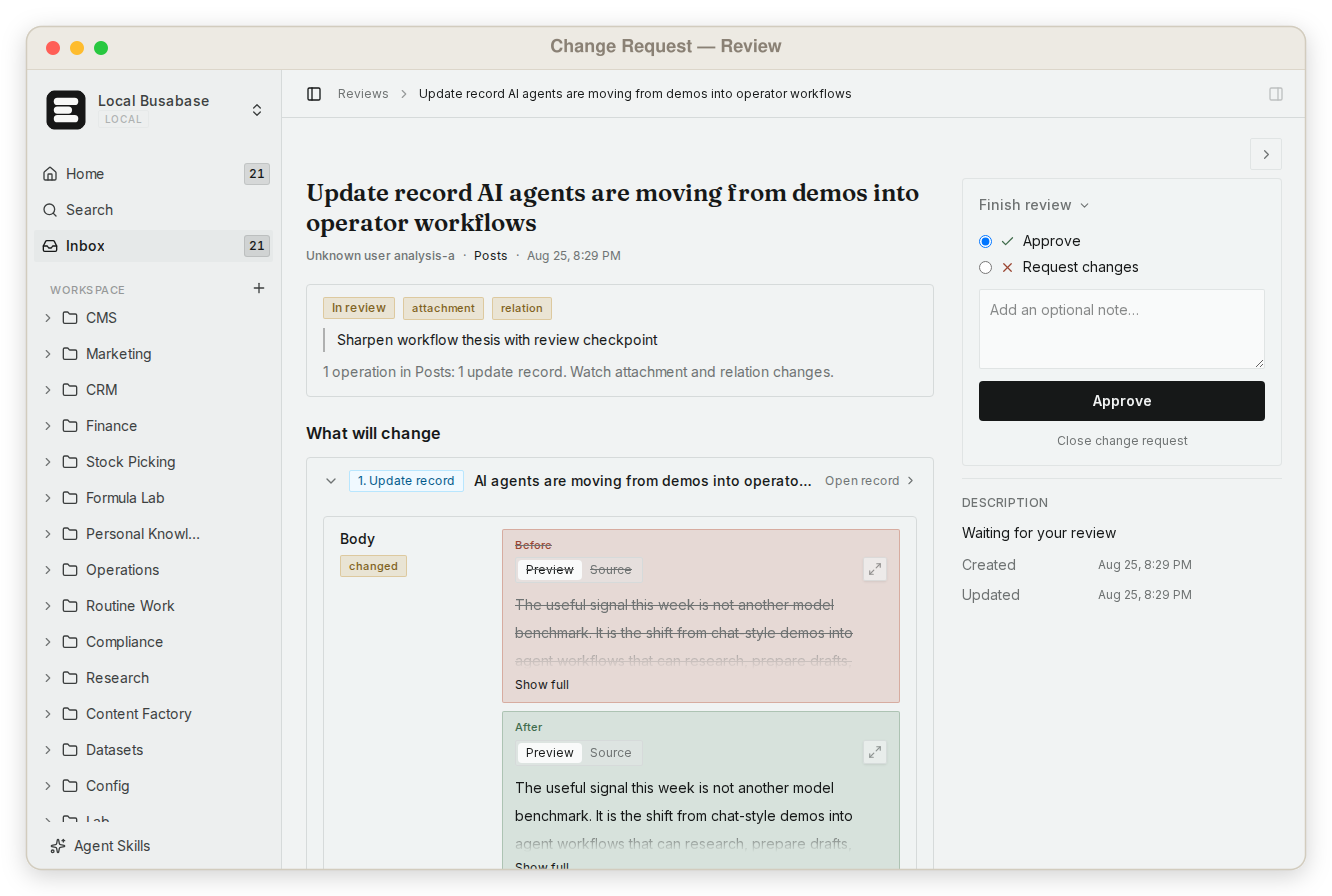
ChatGPT can already take part. Through its MCP app it can read Busabase and propose records, and with a proposal-only key the result arrives as a Change Request with its diff and sources rather than silently becoming canonical (Connect ChatGPT). Claude Code, Cursor, Codex and other agents write to the same records through MCP, Agent Skills, the CLI or the OpenAPI surface, under the same rules. That is decision 4.
The records sit in Bases you can open as a table, gallery, kanban board, calendar or Gantt chart, next to the team's Docs and files in one knowledge base. Agents find exact evidence with one grep across files, Doc bodies, records and prompts, share the same uploaded Skills, and can build AirApps on the data that run in the browser, on your machine, in a cloud sandbox, or as a website on your own domain.
It runs locally with one command, no account needed, or self-hosted for free with no seat limit:
npx busabase server
# → http://localhost:15419/dashboard/local
For a side-by-side on review, agent access, structured data, pricing and data residency, see Busabase vs ChatGPT Space. It says where Space is the better choice, too.
Disclosure: I work on Busabase. We are not neutral about where records should live, which is why every claim about ChatGPT Space above is quoted from, or limited to, what OpenAI had published by the verification date. Where something is "not described", that means we looked and did not find it, not that it cannot be done.
Sources: ChatGPT Space, Space (ChatGPT Learn), Work with pages, Control your dot, ChatGPT Space for Enterprise, ChatGPT release notes, ChatGPT pricing. First verified 30 September 2026; rechecked 13 November 2026. Space changes quickly; check the primary sources before relying on any detail.